

This chapter covers the Spring Framework implementation of the Inversion of Control (IoC) [1] principle
The Spring.Core assembly is the basis for
Spring.NET's IoC container. The IObjectFactory
interface provides an advanced configuration mechanism capable of managing
any type of object. IApplicationContext
is a sub-interface of IObjectFactory. It adds easier
integration with Spring.NET's Aspect Oriented Programming (AOP) features,
message resource handling (for use in internationalization), event
propagation and application layer-specific context such as
WebApplicationContext for use in web
applications.
In short, the IObjectFactory provides the
configuration framework and basic functionality, and the
IApplicationContext adds more enterprise-specific
functionality. The IApplicationContext is a complete
superset of the IObjectFactory and is used exclusively
in this chapter in descriptions of Spring's IoC container.
If you are new to Spring.NET or IoC containers in general, you may want to consider starting with Chapter 41, IoC Quickstarts, which contains a number of introductory level examples that actually demonstrate a lot of what is described in detail below. Don't worry if you don't absorb everything at once... those examples serve only to paint a picture of how Spring.NET hangs together in really broad brushstrokes. Once you have finished with those examples, you can come back to this section which will fill in all the fine detail.
The interface IApplicationContext represents the Spring IoC container and is responsible for instantiating, configuring, and assembling many of the objects in your application. The container gets its instructions on what objects to instantiate, configure, and assemble by reading configuration meta data. The configuration meta data is represented in XML. The configuration meta data allows you to express the objects that compose your application and the rich interdependencies between such objects.
![[Note]](images/admons/note.png) | Note |
|---|---|
|
Note that other ways to specify the meta data, such as attributes and .NET code, are planned for future releases, the core IoC container does not assume any specific meta data format. The Java version of Spring already supports such functionality. |
Several implementations of the IApplicationContext interface are supplied out-of-the-box with Spring. In standalone applications it is common to create an instance of an XmlApplicationContext either programmatically or declaratively in your applications App.config file. In web applications Spring provides a WebApplicationContext implementation which is configured by adding a custom HTTP module and HTTP handler to your Web.config file. See the section on Web Configuration for more details.
The following diagram is a high-level view of how Spring works. Your application classes are combined with configuration meta data so that after the ApplicationContext is created and initialized, you have a fully configured and executable system or application.
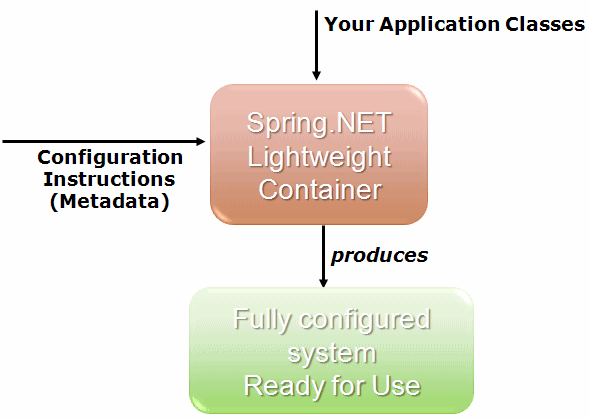
As the preceding diagram shows, the Spring IoC container consumes a form of configuration meta data; this configuration meta data represents how you as an application developer tell the Spring container to instantiate, configure, and assemble the objects in your application. Configuration meta data is supplied in a simple and intuitive XML format
| Note |
|---|---|
|
XML-based meta data is by far the most commonly used form of configuration meta data. It is not however the only form of configuration meta data that is allowed. The Spring IoC container itself is totally decoupled from the format in which this configuration meta data is actually written. Attribute based and code based meta data will be part of an upcoming release and it is already part of the Spring Java framework. |
Spring configuration consists of at least one and typically more
than one object definition that the container must manage. XML- based
configuration shows these objects as <object/>
elements inside a top-level <objects/> element.
These object definitions correspond to the actual objects that
make up your application. Typically you define service layer objects,
data access objects (DAOs), presentation objects such as ASP.NET page
instances, infrastructure objects such as NHibernate
SessionFactories, and so forth. Typically one does
not configure fine-grained domain objects in the container, because it
is usually the responsibility of DAOs and business logic to create/load
domain objects.
The following example shows the basic structure of XML-based configuration meta data:
<objects xmlns="http://www.springframework.net">

  <object id="..." type="...">
    <!-- collaborators and configuration for this object go here -->
  </object>

  <object id="...." type="...">
    <!-- collaborators and configuration for this object go here -->
  </object>

  <!-- more object definitions go here -->

</objects>
The id attribute is a string that you use to
identify the individual object definition. The type attribute defines
the type of the object and uses the fully qualified type name, including
the assembly name. The value of the id attribute
refers to collaborating objects. The XML for referring to collaborating
objects is not shown in this example; Dependencies for more
information.
Spring.NET comes with an XSD schema to make the validation of the XML object definitions a whole lot easier. The XSD document is thoroughly documented so feel free to take a peek inside (see Appendix D, Spring.NET's spring-objects.xsd). The XSD is currently used in the implementation code to validate the XML document. The XSD schema serves a dual purpose in that it also facilitates the editing of XML object definitions inside an XSD aware editor (typically Visual Studio) by providing validation (and Intellisense support in the case of Visual Studio). You may wish to refer to Chapter 40, Visual Studio.NET Integration for more information regarding such integration.
Instantiating a Spring IoC container is straightforward. The location path or paths suppied to an IApplicationContext constructor are actually resource strings that allow the container to load configuration meta data from a variety of external resources such as the local file system, embedded assembly resources, and so on.
IApplicationContext context = new XmlApplicationContext("services.xml", "data-access.xml");
The following example shows the service layer objects
(services.xml) configuration file.
<objects xmlns="http://www.springframework.net">

  <object id="PetStore" type="PetStore.Services.PetStoreService, PetStore">
    <property name="AccountDao" ref="AccountDao"/>
    <property name="ItemDao" ref="ItemDao"/>
    <!-- additional collaborators and configuration for this object go here -->
  </object>

  <!-- more object definitions for services go here -->

</objects>
The following example shows the data access
objects (daos.xml) configuration file:
<objects xmlns="http://www.springframework.net">

  <object id="AccountDao" type="Petstore.Dao.HibernateAccountDao, PetStore">
    <!-- additional collaborators and configuration for this object go here -->
  </object>

  <object id="ItemDao" type="Petstore.Dao.HibernateItemDao, PetStore">
    <!-- additional collaborators and configuration for this object go here -->
  </object>

  <!-- more object definitions for data access objects go here -->
</objects>
In the preceeding example, the service layer consists of the class PetStoreService, and two data access objects of the type HibernateAccountDao and HibernateItemDao are based on the NHibernate Object/Relational mapping framework. The property name element refers to the name of the class's property, and the ref element refers to the name of another object definition. This linkage between id and ref elements expresses the dependency between collaborating objects. For details of configuring an object's dependencies, see Dependencies.
In the previous example the configuration resources are assumed to be located in the bin\Debug directory. You can use Spring's IResource abstraction to load resources from other locations.
The following example shows how to create an IoC container referring to resources located in the root directory of the filesystem an as an embedded assembly resource.
IApplicationContext context = new XmlApplicationContext(
                 "file:///services.xml",
                 "assembly://MyAssembly/MyDataAccess/data-access.xml");
The above example uses Spring.NET's IResource
abstraction. The IResource interface provides a
simple and uniform interface to a wide array of IO resources that can
represent themselves as System.IO.Stream.
| Note |
|---|---|
|
After you learn about Spring's IoC container, you may want to know more about Spring's IResource abstraction to load meta data from other locations as desribed below and alsoin the chapter Chapter 7, Resources |
These resources are most frequently files or URLs but can also
be resources that have been embedded inside a .NET assembly. A simple
URI syntax is used to describe the location of the resource, which
follows the standard conventions for files, i.e.
file:///services.xml and other well known protocols
such as http.
The following snippet shows the use of the URI syntax for
referring to a resource that has been embedded inside a .NET assembly,
assembly://<AssemblyName>/<NameSpace>/<ResourceName>.
The IResource abstraction is explained further in
Section 7.1, “Introduction”.
| Note |
|---|---|
|
To create an embedded resource using Visual Studio you must set the Build Action of the .xml configuration file to Embedded Resource in the file property editor. Also, you will need to explicitly rebuild the project containing the configuration file if it is the only change you make between successive builds. If using NAnt to build, add a <resources> section to the csc task. For example usage, look at the Spring.Core.Tests.build file included the distribution. |
You can also create a container by using a custom configuration
section in the standard .NET application configuration file (one of
App.config or Web.config). A
custom configuration section that creates the same
IApplicationContext as the previous example is
<spring>
  <context>
    <resource uri="file://services.xml"/>
    <resource uri="assembly://MyAssembly/MyDataAccess/data-access.xml"/>
  </context>
</spring>
The context type (specified as the value of
the type attribute of the
context element) is optional. In a standalone
application the context type defaults to the
Spring.Context.Support.XmlApplicationContext class
and in a Web application defaults to WebApplicationContext. An example
of explicitly configuring the context type The following example shows
explicit use of the context type attribute:
<spring>
  <context type="Spring.Context.Support.XmlApplicationContext, Spring.Core">
    <resource uri="file:///services.xml"/>
    <resource uri="assembly://MyAssembly/MyDataAccess/data-access.xml"/>
  </context>
</spring>
To acquire a reference to an
IApplicationContext using a custom configuration
section, one simply uses the following code;
IApplicationContext ctx = ContextRegistry.GetContext();
The ContextRegistry is used to both instantiate the
application context and to perform service locator style access to
other objects. (See Section 5.15, “Service Locator access” for more
information). The glue that makes this possible is an implementation
of the Base Class Library (BCL) provided
IConfigurationSectionHandler interface, namely the
Spring.Context.Support.ContextHandler class. The
handler class needs to be registered in the
configSections section of the .NET configuration
file as shown below.
<configSections>
  <sectionGroup name="spring">
    <section name="context" type="Spring.Context.Support.ContextHandler, Spring.Core"/>
  </sectionGroup>
</configSections>
This declaration now enables the use
of a custom context section starting at the spring
root element.
In some usage scenarios, user code will not have to explicitly
instantiate an appropriate implementation
IApplicationContext interface, since Spring.NET
code will do it for you. For example, the ASP.NET web layer provides
support code to load a Spring.NET
WebApplicationContext automatically as part of the
normal startup process of an ASP.NET web application. As such, once
the container has been created for you, it is often the case that you
will never need to explicitly interact with it again in your code, for
example when configuring ASP.NET pages.
Spring.NET comes with an XSD schema to make the validation of the XML object definitions a whole lot easier. The XSD document is thoroughly documented so feel free to take a peek inside (see Appendix D, Spring.NET's spring-objects.xsd). The XSD is currently used in the implementation code to validate the XML document. The XSD schema serves a dual purpose in that it also facilitates the editing of XML object definitions inside an XSD aware editor (typically Visual Studio) by providing validation (and Intellisense support in the case of Visual Studio). You may wish to refer to Chapter 40, Visual Studio.NET Integration for more information regarding such integration.
Your XML object definitions can also be defined within the
standard .NET application configuration file by registering the
Spring.Context.Support.DefaultSectionHandler class
as the configuration section handler for inline object definitions.
This allows you to completely configure one or more
IApplicationContext instances within a single
standard .NET application configuration file as shown in the following
example.
<configuration>

  <configSections>
    <sectionGroup name="spring">
      <section name="context" type="Spring.Context.Support.ContextHandler, Spring.Core"/>
      <section name="objects" type="Spring.Context.Support.DefaultSectionHandler, Spring.Core" />
    </sectionGroup>
  </configSections>

  <spring>

    <context>
      <resource uri="config://spring/objects"/>
    </context>

    <objects xmlns="http://www.springframework.net">
        ...
    </objects>

  </spring>

</configuration>
Other options available to structure the configuration files are described in Section 5.12.1, “Context Hierarchies” and Section 5.2.2.3, “Composing XML-based configuration meta data”.
The IApplicationContext can be configured to
register other resource handlers, custom parsers to integrate
user-contributed XML schema into the object definitions section, type
converters, and define type aliases. These features are discussed in
section Section 5.11, “Configuration of IApplicationContext”
It can be useful to have object definitions span multiple XML files. Often each individual XML configuration file represents a logical layer or module in your architecture.
You can use the IApplicationContext
constructor to load object definitions from all these XML fragments.
This constructor takes multiple IResource
locations, as was shown in the previous section. Alternatively, use
one or more occurrences of the <import/>
element to load object definitions from another file (or files). For
example:
<objects xmlns="http://www.springframework.net">

  <import resource="services.xml"/>
  <import resource="resources/messageSource.xml"/>
  <import resource="/resources/themeSource.xml"/>

  <object id="object1" type="..."/>
  <object id="object2" type="..."/>

</objects>
In the preceeding example, external object definitions are being
loaded from three files, services.xml,
messageSource.xml, and
themeSource.xml. All location paths are relative to
the definition file doing the importing, so
services.xml must be in the same directory as the
file doing the importing, while messageSource.xml
and themeSource.xml must be in a
resources location below the location of the
importing file. As you can see, a leading slash is ignored, but given
that these paths are relative, it is better form not to use the slash
at all. The contents of the files being imported, including the top
level <objects/> element, must be valid XML
object definitions according to the Spring Schema.
An IApplicationContext is the interface for an
advanced factory capable of maintaining a registry of different objects
and their dependencies. Using the method
GetObject(string) or the indexer
[string] you can retrieve instances of your
objects.
The IApplicationContext enables you to read
object definitions and access them as follows:
// create and configure objects
IApplicationContext context = new XmlApplicationContext("services.xml", "daos.xml");

// retrieve configured instance
PetStoreService service = (PetStoreService) context.GetObject("PetStoreService");

// use configured instance
IList userList = service.GetUserNames();
You use the method GetObject to retrieve
instances of your objects. The IApplicationContext interface has a few
other methods for retrieving objects, but ideally your application code
should never use them. Indeed, your application code should have no
calls to the GetObject method at all, and thus no dependency on Spring
APIs at all. For example, Spring's integration with web frameworks
provides for dependency injection for various web framework classes such
as ASP.NET pages and user controls.
| Note |
|---|---|
|
The syntactical inconvenience of the cast will be addressed in a future release of Spring.NET that is based on a generic API. Note, that even when using a generic API, looking up an object by name in no way guarantees that the return type will be that of the generic type. |
A Spring IoC container manages one or more objects. These objects are created with the configuration meta data that you supply to the container.
Within the container itself, these object definitions are represented as IObjectDefinition objects, which contain (among other information) the following meta data:
A type name: typically the actual implementation class of the object being defined..
Object behavioral configuration elements, which state how the object should behave in the container (i.e. prototype or singleton, lifecycle callbacks, and so forth)
References to other objects which are needed for the object to do its work: these references are also called collaborators or dependencies.
Other configuration settings to set in the newly created object. An example would be the number of threads to use in an object that manages a worker thread pool, or the size limit of the pool.
This meta data translates to a set of properties that make up each object definition. The following table lists some of these properties, with links to documentation
| Property | More info |
|---|---|
| type | Section 5.2.5, “Instantiating objects” |
| id and name | Section 5.2.4.1, “Naming objects” |
| singleton or prototype | Section 5.4, “Object Scopes” |
| object properties | Section 5.3.1, “Dependency injection” |
| constructor arguments | Section 5.3.1, “Dependency injection” |
| autowiring mode | Section 5.3.6, “Autowiring collaborators” |
| dependency checking mode | Section 5.3.7, “Checking for dependencies” |
| initialization method | Section 5.6.1, “Lifecycle interfaces” |
| destruction method | Section 5.6.1, “Lifecycle interfaces” |
In addition to object definitions which contain information on how
to create a specific object, the
IApplicationContext implementations also permit
the registration of existing objects that are created outside the
container, by users. This is done by accessing the
ApplicationContext's
IObjectFactory via the property
ObjectFactory which returns the
IObjectFactory implementation
DefaultListableObjectFactory.
DefaultListableObjectFactory supports
registration through the methods
RegisterSingleton(..) and
RegisterObjectDefinition(..). However, typical
applications work soley with objects defined through meta data object
definitions.
Every object has one or more identifiers. These identifiers must be unique within the container that hosts the objects. An object usually has only one identifier, but if it requires more than one, the extra ones can be considered aliases.
When using XML-based configuration meta data, you use the
'id' and/or 'name'attributes to
specify the object identifier(s). The 'id'
attribute allows you to specify exactly one id, and because it is a
real XML element ID attribute, the XML parser is able to do some extra
validation when other elements reference the id. As such, it is the
preferred way to specify an object id. However, the XML specification
does limit the characters which are legal in XML IDs. This is usually
not a constraint, but if you have a need to use one of these special
XML characters, or want to introduce other aliases to the object, you
can specify them in the 'name' attribute ,
separated by a comma (,), semicolon
(;), or whitespace.
| Note |
|---|---|
|
You are not required to supply a name or id for a object. If no name or id is supplied explicitly, the container will generate a unique name for that object. However, if you want to refer to that object by name, through the use of the ref element or Service Location style lookup, you must provide a name. The motivations for not supplying a name for a object are to use autowiring and inline-objects which will be discussed later. |
In an object definition itself, you may supply more than one
name for the object, by using a combination of up to one name
specified by the id attribute, and any number of
other names in the name attribute. These names
are equivalent aliases to the same object, and are useful for some
situations, such as allowing each component in an application to
refer to a common dependency by using a object name that is specific
to that component itself.
Specifying all aliases where the object is actually defined is not always adequate, however. It is sometimes desirable to introduce an alias for an object that is defined elsewhere. This is commonly the case in large systems where configuration is split amongst each subsystem, each subsystem having its own set of object definitions. In XML-based configuration meta data, you can use of the <alias/> element to accomplish this.
<alias name="fromName" alias="toName"/>
In this case, an object in the same container which is named
fromName, may also after the use of this alias
definition, be referred to as toName.
For example, the configuration meta data for subsystem A may refer to a DbProvider via the name 'SubsystemA-DbProvider. The configuration meta data for subsystem B may refer to a DbProvider via the name 'SubsystemB-DbProvider'. When composing the main application that uses both these subsystems the main application refers to the DbProvider via the name 'MyApp-DbProvider'. To have all three names refer to the same object you add to the MyApp configuration meta data the following aliases definitions:
<alias name="SubsystemA-DbProvider" alias="SubsystemB-DbProvider"/>
<alias name="SubsystemA-DbProvider" alias="MyApp-DbProvider"/>
Now each component and the main app can refer to the connection through a name that is unique and guaranteed not to clash with any other definition (effectively there is a namespace), yet they refer to the same object.
An object definition essentially is a recipe for creating one or more objects. The container looks at the recipe for a named object when asked, and uses the configuration meta data encapsulated by that object definition to create (or acquire) an actual object.
If you are using XML-based configuration meta data, you can specify
the type of object that is to be instantiated in the
'type' attribute of the
<object/> element. This
'type' attribute (which internally is a
Type property on a
IObjectDefinition instance) is usually mandatory.
(For exceptions see the section called Instantiation
using an instance factory method and Object definition inheritance.)
You use the Type property in one of two ways:
Typically, to specify the type of of the object to be constructed in the case where the container itself directly creates the object by calling its constructor reflectively, somewhat equivalent to C# code using the 'new' operator.
To specify the actual class containing the
static factory method that will be invoked to
create the object, in the less common case where the container
invokes a static factory
method on a class to create the object. The object type returned
from the invocation of the static factory method
may be the same type or another type entirely.
When you create an object using the constructor approach, all normal classes are usable by and compatible with Spring. That is, the class being developed does not need to implement any specific interfaces or to be coded in a specific fashion. Simply specifying the object type should be sufficient. However, depending on what type of IoC you are going to use for that specific object, you may need to create a default constructor.
With XML-based configuration meta data you can specify your object class as follows:
<object id="exampleObject" type="Examples.ExampleObject, ExamplesLibrary"/>
For details about the mechanism for supplying arguments to the constructor (if required), and setting object instance properties after the object is constructed, see Section 5.3.1, “Dependency injection”.
This XML fragment describes an object definition that will be
identified by the exampleObject name, instances
of which will be of the Examples.ExampleObject type
that has been compiled into the ExamplesLibrary
assembly. Take special note of the structure of the
type attribute's value... the namespace-qualified
name of the class is specified, followed by a comma, followed by (at a
bare minimum) the name of the assembly that contains the class. In the
preceding example, the ExampleObject class is
defined in the Examples namespace, and it has been
compiled into the ExamplesLibrary assembly.
The name of the assembly that contains the type
must be specified in the type
attribute. Furthermore, it is recommended that you specify the fully
qualified assembly name [2] in order to guarantee that the type that Spring.NET uses
to instantiate your object (s) is indeed the one that you expect.
Usually this is only an issue if you are using classes from (strongly
named) assemblies that have been installed into the Global Assembly
Cache (GAC).
If you have defined nested classes use the addition symbol, +,
to reference the nested class. For example, if the class
Examples.ExampleObject had a nested class
Person the XML declaration would be
<object id="exampleObject" type="Examples.ExampleObject+Person, ExamplesLibrary"/>
If you are defining classes that have been compiled into
assemblies that are available to your application (such as the
bin directory in the case of ASP.NET applications)
via the standard assembly probing mechanisms, then you can specify
simply the name of the assembly (e.g.
ExamplesLibrary.Data)... this way, when (or if) the
assemblies used by your application are updated, you won't have to
change the value of every <object/>
definition's type attribute to reflect the new
version number (if the version number has changed)... Spring.NET will
automatically locate and use the newer versions of your assemblies
(and their attendant classes) from that point forward.
When defining an object which is to be created using a static factory method, you use the type attribute to specify the type containing the static factory method and an attribute named factory-method to specify the name of the factory method itself. You should be able to call this method (with an optional list of arguments as described later) and return a live object, which subsequently is treated as if it had been created through a constructor. One use for such an object definition is to call static factories in legacy code.
The following object definition specifies that the object will
be created by calling a factory-method. The definition does not
specify the type of the returned object, only the type containing the
factory method. In this example, CreateInstance
must be a static method.
<object id="exampleObject"
      type="Examples.ExampleObjectFactory, ExamplesLibrary"
      factory-method="CreateInstance"/>
For details about the mechanism for supplying (optional) arguments to the factory method and setting object instance properties after it has been returned from the factory, see Section 5.3.2, “Dependencies and configuration in detail”
Similar to instantiation through a static factory
method, instantiation with an instance factory method invokes a
a non-static method on an existing object from the container to create
a new object. To use this mechanism, leave the type
attribute empty, and in the factory-object
attribute specify the name of an object in the current (or
parent/ancestor) container that contains the instance method that is
to be invoked to create the object. Set the name of the factory method
itself with the factory-method
attribute.
<!-- the factory object, which contains an instance method called 'CreateInstance' -->
<object id="exampleFactory" type="...">
  <!-- inject any dependencies required by this object -->
</object>

<!-- the object that is to be created by the factory object -->
<object id="exampleObject"
      factory-method="CreateInstance"
      factory-object="exampleFactory"/>
This approach shows that the factory object itself can be managed and configured through dependency injection (DI). See Dependencies and configuraiton in detail.
Generic types can also be created in much the same manner an non-generic types.
The following examples shows the definition of simple generic types and how they can be created in Spring's XML based configuration file.
namespace GenericsPlay
{
    public class FilterableList<T>
    {
        private List<T> list;

        private String name;

        public List<T> Contents
        {
            get { return list; }
            set { list = value; }
        }

        public String Name
        {
            get { return name; }
            set { name = value; }
        }

        public List<T> ApplyFilter(string filterExpression)
        {
            /// should really apply filter to list ;)
            return new List<T>();
        }

    }
}
The XML configuration to create and configure this object is shown below
<object id="myFilteredIntList" type="GenericsPlay.FilterableList<int>, GenericsPlay"> <property name="Name" value="My Integer List"/> </object>
There are a few items to note in terms how to
specify a generic type. First, the left bracket that specifies the
generic type, i.e. <, is replaced with the
string < due to XML escape syntax for the less than symbol.
Yes, we all realize this is less than ideal from the readability point
of view. Second, the generic type arguments can not be fully assembly
qualified as the comma is used to separate generic type arguments.
Alternative characters used to overcome the two quirks can be
implemented in the future but so far, all proposals don't seem to help
clarify the text. The suggested solution to improve readability is to
use type aliases as shown below
<typeAliases> <alias name="GenericDictionary" type=" System.Collections.Generic.Dictionary<,>" /> <alias name="myDictionary" type="System.Collections.Generic.Dictionary<int,string>" /> </typeAliases>
So that instead of something like this
<object id="myGenericObject"
type="GenericsPlay.ExampleGenericObject<System.Collections.Generic.Dictionary<int , string>>, GenericsPlay" />It can be shortened to
<object id="myOtherGenericObject"
type="GenericsPlay.ExampleGenericObject<GenericDictionary<int , string>>, GenericsPlay" />or even shorter
<object id="myOtherOtherGenericObject"
type="GenericsPlay.ExampleGenericObject<MyIntStringDictionary>, GenericsPlay" />
Refer to Section 5.11, “Configuration of IApplicationContext” for additional information on using type aliases.
The following classes are used to demonstrate the ability to create instances of generic types that themselves are created via a static generic factory method.
public class TestGenericObject<T, U>
{
    public TestGenericObject()
    {
    }

    private IList<T> someGenericList = new List<T>();

    private IDictionary<string, U> someStringKeyedDictionary =
        new Dictionary<string, U>();

    public IList<T> SomeGenericList
    {
        get { return someGenericList; }
        set { someGenericList = value; }
    }

    public IDictionary<string, U> SomeStringKeyedDictionary
    {
        get { return someStringKeyedDictionary; }
        set { someStringKeyedDictionary = value; }
    }

}
The accompanying factory class is
public class TestGenericObjectFactory
{
    public static TestGenericObject<V, W> StaticCreateInstance<V, W>()
    {
        return new TestGenericObject<V, W>();
    }

    public TestGenericObject<V, W> CreateInstance<V, W>()
    {
        return new TestGenericObject<V, W>();
    }
}
The XML snippet to create an instance of TestGenericObject
where V is a List of integers and
W is an integer is shown below
<object id="myTestGenericObject"
type="GenericsPlay.TestGenericObjectFactory, GenericsPlay"
factory-method="StaticCreateInstance<System.Collections.Generic.List<int>,int>"
/>The StaticCreateInstance method is responsible for instantiating the object that will be associated with the id 'myTestGenericObject'.
Using the class from the previous example the XML snippet to create an instance of a generic type via an instance factory method is shown below
<object id="exampleFactory" type="GenericsPlay.TestGenericObject<int,string>, GenericsPlay"/>
<object id="anotherTestGenericObject"
factory-object="exampleFactory"
factory-method="CreateInstance<System.Collections.Generic.List<int>,int>"/>
This creates an instance of
TestGenericObject<List<int>,int>
A typical enterprise application does not consist of a single object. Even the simplest application has a few objects that work together to present what the end-user sees as a coherent application. This next section explains how you go from defining a number of object definitions that stand-alone to a fully realized application where objects collaborate to achieve a goal.
Dependency injection (DI) is a process whereby objects define their dependencies, that is, the other objects they work with, only through constructor arguments and properties that are set on the object instance after it is constructed. (Factory methods may be considered a special case of providing constructor arguments for the purposes of this description). The container injects these dependencies when it creates the object. This process is fundamentally the inverse to the case when the object itself is controlling the instantiation or location of its dependencies by using direct construction of classes, or the Service Locator pattern. The inverting of this responsibility is why the name Inversion of Control (IoC) is used to describe the container's actions.
Code is cleaner when using DI and decoupling is more effective when objects are provided with their dependencies. The object does not look up its dependencies, and does not know the location or class of the dependencies. Long sections of initialization code that you used to hide in a #region tag simply go away, and are placed by container configuration meta data. One can also consider this clean up an application of the principal of Separation of Concerns. Before using DI, you class was responsible for business logic AND its configuration, it was concerns with doing more than one thing. DI removes the responsibility of configuration from the class, leaving it only with a single purpose, as the location of business logic. Furthermore, since you class does not know the location of its dependencies these classes also become easier to test, in particular when the dependencies are interfaces or abstract base classes allowing for stub or mock implementation to be used in unit tests.
Dependency injection exists in two major variants, Constructor-based dependency injection and Setter-based dependency injection.
Constructor-based DI is accomplished by the container invoking a constructor with a number of arguments, each representing a dependency. Calling a static factory method with specific arguments to construct the object is nearly equivalent, and this discussion treats arguments to a constructor and to a static factory method similarly. The following example shows a class that can only be dependency-injected with constructor injection. Notice that there is nothing special about this class (no container specific interfaces, base classes or attributes)
public class SimpleMovieLister
{
  // the SimpleMovieLister has a dependency on a MovieFinder
  private IMovieFinder movieFinder;

  // a constructor so that the Spring container can 'inject' a MovieFinder
  public MovieLister(IMovieFinder movieFinder)
  {
    this.movieFinder = movieFinder;
  }

  // business logic that actually 'uses' the injected IMovieFinder is omitted...

}
Constructor argument resolution matching occurs using the argument's type. If ambiguity exists in the constructor arguments of a object definition, then the order in which the constructor arguments are defined in a object definition is the order in which those arguments are supplied to the appropriate constructor when the object being instantiated. Consider the following class:
namespace X.Y
{
    public class Foo
    {
        public Foo(Bar bar, Baz baz)
        {
           // ...
        }
    }
}
No potential ambiguity exists, assuming of course that Bar and
Baz classes are not related by inheritance. Thus the following
configuration will work just fine, and you do not need to specify
the constructor argument indexes and / or types explicitly in the
<contructor-arg/> element.
<object id="foo" type="X.Y.Foo, Example">
  <constructor-arg ref="bar"/>
  <constructor-arg ref="baz"/>
</object>

<object id="bar" type="X.Y.Bar, Example"/>
<object id="baz" type="X.Y.Baz, Example"/>
When another object is referenced, the type is known, and matching can occur (as was the case with the preceding example).
When a simple type is used, such as
<value>true<value>, Spring cannot
determine the type of the value, and so cannot match by type without
help. Consider the following class:
using System;

namespace SimpleApp
{
  public class ExampleObject
  {
    private int years;              //No. of years to the calculate the Ultimate Answer

    private string ultimateAnswer;  //The Answer to Life, the Universe, and Everything

    public ExampleObject(int years, string ultimateAnswer)
    {
       this.years = years;
       this.ultimateAnswer = ultimateAnswer;
    }

}
In the preceding scenario, the container
can use type matching with simple types by
explicitly specifying the type of the constructor argument using
the 'type' attribute. For example:
<object name="exampleObject" type="SimpleApp.ExampleObject, SimpleApp">
  <constructor-arg type="int" value="7500000"/>
  <constructor-arg type="string" value="42"/>
</object>
The type attribute specifies the
System.Type of the constructor argument, such
as System.Int32. Alias' are available to for common simple types
(and their array equivalents). These alias' are...
| Type | Alias' | Array Alias' |
|---|---|---|
| System.Char | char, Char | char[], Char() |
| System.Int16 | short, Short | short[], Short() |
| System.Int32 | int, Integer | int[], Integer() |
| System.Int64 | long, Long | long[], Long() |
| System.UInt16 | ushort | ushort[] |
| System.UInt32 | uint | uint[] |
| System.UInt64 | ulong | ulong[] |
| System.Float | float, Single | float[], Single() |
| System.Double | double, Double | double[], Double() |
| System.Date | date, Date | date[], Date() |
| System.Decimal | decimal, Decimal | decimal[], Decimal() |
| System.Bool | bool, Boolean | bool[], Boolean() |
| System.String | string, String | string[], String() |
Use the index attribute to specify
explicitly the index of constructor arguments. For example:
<object name="exampleObject" type="SimpleApp.ExampleObject, SimpleApp">
  <constructor-arg index="0" value="7500000"/>
  <constructor-arg index="1" value="42"/>
</object>
In addition to resolving the ambiguity of multiple simple values, specifying an index also resolves ambiguity where a constructor has two arguments of the same type. Note that the index is 0 based.
You can specify constructor argumetn by name using
name attribute of the
<constructor-arg> element.
<object name="exampleObject" type="SimpleApp.ExampleObject, SimpleApp">
  <constructor-arg name="years" value="7500000"/>
  <constructor-arg name="ultimateAnswer" value="42"/>
</object>
Setter-based DI is accomplished by the container invoking setter properties on your objects after invoking a no-argument constructor or no-argument static factory method to instantiate your object.
The following eample shows a class that can only be dependency injected using pure setter injection.
public class MovieLister
{
  private IMovieFinder movieFinder;

  public IMovieFinder MovieFinder
  {
      set
      {
          movieFinder = value;
      }
  }

  // business logic that actually 'uses' the injected IMovieFinder is omitted...
}
The IAppliationContext supports constructor-
and setter-based DI for the objects it manages. It also supports
setter-based DI after some dependencies have already been supplied via
the constructor approach..
The configuration for the dependencies comes in the form of the
IObjectDefinition class, which is used together
with TypeConverters to know how to convert
properties from one format to another. However, most users of
Spring.NET will not be dealing with these classes directly (that is
programatically), but rather with an XML definition file which will be
converted internally into instances of these classes, and used to load
an entire Spring IoC container instance. Refer to Section 6.3, “Type conversion” for more information regarding
type conversion, and how you can design your classes to be convertible
by Spring.NET.
The container resolves object dependeices as:
The IApplicationContext is created and
initialized with a configuration that describes all the objects.
Most Spring.NET users use an IObjectFactory
or IApplicationContext variant that supports
XML format configuration files.
Each object has dependencies expressed in the form of properties, constructor arguments, or arguments to the static-factory method if you are using that instead of a normal constructor. These dependencies apre provided to the object, when the object is actually created.
Each property or constructor argument is either an actual definition of the value to set, or a reference to another object in the container.
Each property or constructor argument which is a value
must be able to be converted from whatever format it was
specified in, to the actual System.Type of
that property or constructor argument. By default Spring.NET can
convert a value supplied in string format to all built-in types,
such as int, long,
string, bool, etc.
The Spring container validates the configuration of each object as the container is created, including the validation of whether object reference properties refer to valid object. However, the object properties themselves are not set until the object is actually created. Objects that are defined as singletons and set to be pre-instantiated, are created when the container is created. Otherwise, the object is created only when it is requested. Creation of an object potentially causes a graph of objects to be created as the objects dependencies and its dependencies' dependencies (and so on) are created and assigned.
You can generally trust Spring.NET to do the right thing. It
detects configuration problems, such as references to non-existent
object definitions and circular dependencies, at container load-time.
Spring sets properties and resolves dependencies as late as possible,
which is when the object is actually created. This means that a Spring
container which has loaded correctly can later generate an exception
when you request an object if there is a problem creating that object
or one of its dependencies. For example, the object throws an
exception as a result of a missing or invalid property. This
potentially delayed visibility of some configuration issues is why
IApplicationContext by default pre-instantiate
singleton objects. At the cost of some upfront time and memory to
create these objects before they are actually needed, you discover
configuration issues when the IApplicationContext
is created, not later. If you wish, you can still override this
default behavior and set any of these singleton objects will
lazy-initialize, rather than be pre-instantiated.
If no circular dependencies exist, when one or more
collaborating objects are being injected into a dependent object, each
collaborating object is totally configured prior
to being passed into the dependent object. This means that if object A
has a dependency on object B, the Spring IoC container completely
configures object B prior to invoking the setter method on object A.
In other words, the object is instantiated (if not a pre-instantiated
singleton), its dependencies are set, and the relevant lifecycle
methods (such as a configured init method or the
IIntializingObject callback method) will all be
invoked.
First, an example of using XML-based configuration meta data for setter-based DI. A small part of a Spring XML configuration file specifying some object definitions:
<object id="exampleObject" type="Examples.ExampleObject, ExamplesLibrary">

    <!-- setter injection using the ref attribute -->
    <property name="objectOne" ref="anotherExampleObject"/>
    <property name="objectTwo" ref="yetAnotherObject"/>
    <property name="IntegerProperty" value="1"/>
</object>

<object id="anotherExampleObject" type="Examples.AnotherObject, ExamplesLibrary"/>
<object id="yetAnotherObject" type="Examples.YetAnotherObject, ExamplesLibrary"/>
[C#]
public class ExampleObject
{
  private AnotherObject objectOne;
  private YetAnotherObject objectTwo;
  private int i;

  public AnotherObject ObjectOne
  {
    set { this.objectOne = value; }
  }

  public YetAnotherObject ObjectTwo
  {
    set { this.objectTwo = value; }
  }

  public int IntegerProperty
  {
    set { this.i = value; }
  }
}
In the preceding example, setters have been declared to match against the properties specified in the XML file. Find below an example of using constructor-based DI.
<object id="exampleObject" type="Examples.ExampleObject, ExamplesLibrary">
    <constructor-arg name="objectOne" ref="anotherExampleObject"/>
    <constructor-arg name="objectTwo" ref="yetAnotherObject"/>
    <constructor-arg name="IntegerProperty" value="1"/>
</object>

<object id="anotherExampleObject" type="Examples.AnotherObject, ExamplesLibrary"/>
<object id="yetAnotherObject" type="Examples.YetAnotherObject, ExamplesLibrary"/>
[Visual Basic.NET]
Public Class ExampleObject

    Private myObjectOne As AnotherObject
    Private myObjectTwo As YetAnotherObject
    Private i As Integer

    Public Sub New (
        anotherObject as AnotherObject,
        yetAnotherObject as YetAnotherObject,
        i as Integer)

        myObjectOne = anotherObject
        myObjectTwo = yetAnotherObject
        Me.i = i
    End Sub
End Class
The constructor arguments specified in the object
definition will be used to pass in as arguments to the constructor of
the ExampleObject.
Now consider a variant of this where instead of using a constructor, Spring is told to call a static factory method to return an instance of the object
<object id="exampleObject" type="Examples.ExampleFactoryMethodObject, ExamplesLibrary"
     factory-method="CreateInstance">
    <constructor-arg name="objectOne" ref="anotherExampleObject"/>
    <constructor-arg name="objectTwo" ref="yetAnotherObject"/>
    <constructor-arg name="intProp" value="1"/>
</object>

<object id="anotherExampleObject" type="Examples.AnotherObject, ExamplesLibrary"/>
<object id="yetAnotherObject" type="Examples.YetAnotherObject, ExamplesLibrary"/>
[C#]
public class ExampleFactoryMethodObject
{
  private AnotherObject objectOne;
  private YetAnotherObject objectTwo;
  private int i;

  // a private constructor
  private ExampleFactoryMethodObject()
  {
  }

  public static ExampleFactoryMethodObject CreateInstance(AnotherObject objectOne,
                               YetAnotherObject objectTwo,
                               int intProp)
  {
    ExampleFactoryMethodObject fmo = new ExampleFactoryMethodObject();
    fmo.AnotherObject = objectOne;
    fmo.YetAnotherObject = objectTwo;
    fmo.IntegerProperty = intProp;
    return fmo;
  }

  // Property definitions

}
Arguments to the static factory method are supplied via
<constructor-arg/> elements, exactly the same
as if a constructor had actually been used. The type of the class
being returned by the factory method does not have to be of the same
type as the class which contains the static factory method, although
in this example it is. An instance (non-static) factory method would
be used in an essentially identical fashion (aside from the use of the
factory-object attribute instead of the
type attribute), so will not be detailed
here.
Note that Setter Injection and Constructor Injectionare not mutually exclusive. It is perfectly reasonable to use both for a single object definition, as can be seen in the following example:
<object id="exampleObject" type="Examples.MixedIocObject, ExamplesLibrary">
    <constructor-arg name="objectOne" ref="anotherExampleObject"/>
    <property name="objectTwo" ref="yetAnotherObject"/>
    <property name="IntegerProperty" value="1"/>
</object>

<object id="anotherExampleObject" type="Examples.AnotherObject, ExamplesLibrary"/>
<object id="yetAnotherObject" type="Examples.YetAnotherObject, ExamplesLibrary"/>
[C#]
public class MixedIocObject
{
  private AnotherObject objectOne;
  private YetAnotherObject objectTwo;
  private int i;

  public MixedIocObject (AnotherObject obj)
  {
    this.objectOne = obj;
  }

  public YetAnotherObject ObjectTwo
  {
    set { this.objectTwo = value; }
  }

  public int IntegerProperty
  {
    set { this.i = value; }
  }
}
As mentioned in the previous section, you can define object
properties and constructor arguments as either references to other
managed objects (collaborators), or as values defined inline. Spring's
XML-based configuration meta data supports sub-element types within its
<property/> and
<constructor-arg/> elements for this
purpose.
The value attribute of the
<property/> element specifies a property or
constructor argument as a human-readable string representation. As
mentioned previously, TypeConverter instances are
used to convert these string values from a
System.String to the actual property or argument
type.
In the following example, we use a
SqlConnection from the
System.Data.SqlClient namespace. This class (like
many other existing classes) can easily configured by Spring as it
offers a convenient public property for configuration of its
ConnectionString property.
<objects xmlns="http://www.springframework.net">
  <object id="myConnection" type="System.Data.SqlClient.SqlConnection">
      <!-- results in a call to the setter of the ConnectionString property -->
      <property
          name="ConnectionString"
          value="Integrated Security=SSPI;database=northwind;server=mySQLServer"/>
  </object>
</objects>
An idref element is simply an error-proof way to pass the
id (string value - not a reference) of another
object in the container to a
<constructor-arg/> or
<property/> element.
<object id="theTargetObject" type="...">
   . . .
</object>

<object id="theClientObject" type="...">
  <property name="targetName">
    <idref object="theTargetObject"/>
  </property>
</object>
This above object definition snipped is exactly equivalent (at runtime) to the following snippit:
<object id="theTargetObject" type="...">
  . . .
</object>

<object id="theClientObject" type="...">
  <property name="targetName" value="theTargetObject"/>
</object>
The first form is preferable to the second is
that using the idref tag allows the container to
validate at deployment time that the
referenced, named object actually exists. In the second variation,
no validation is performed on the value that is passed to the
targetName property of the client object. Typos
are only discovered (with most likely fatal results) when the
'client' object is actually instantiated. If the 'client' object is
a prototype object, this typo and the resulting exception may only
be discovered long after the container is deployed.
Additionally, if the reference object is in the same XML unit,
and the object name is the object id, you can
use the local attribute which allows the XML
parser itself to validate the object name earlier, at XML document
parse time.
<property name="targetName">
  <idref local="theTargetObject"/>
</property>
Usually all leading and trailing whitespaces are trimmed from a <value /> element's text. In some cases it is necessary to maintain whitespaces exactly as they are written into the xml element. The parser does understand the xml:space attribute in this case:
<property name="myProp"> <value xml:space="preserve"> 

	</value> </property>
The above configuration will result in the string " \n\r\t". Note, that you don't have to explicitly specify the 'xml' namespace on top of your configuration.
The ref element is the final element allowed
inside a <constructor-arg/> or
<property/> definition element. Here you set the value
of the specified property to be a reference to another object (a
collaborator) managed by the container. The referenced object is a
dependency of the object whose property will be set, and it is
initialized on demand as needed before the property is set. (If the
collaborator is a singleton object it may be initialized already by
the container.) All references are ultimately just a reference to
another object. Scoping and validation depend on whether you specify
the id/name of the object through the object,
local, or parent
attributes.
Specifying the target object through the
object attribute of the ref tag
is the most general form, and allows creation of a reference to any
object in the same container or parent container, regardless of
whether it is in the same XML file. The value of the
object attribute may be the same as the
id attribute of the target object, or as one of the
values in the name attribute of the target
object.
<ref object="someObject"/>
Specifying the target object by using the
local attribute leverages the ability of the XML
parser to validate XML id references within the same file. The value
of the local attribute must be the same as the
id attribute of the target object. The XML parser
will issue an error if no matching element is found in the same file.
As such, using the local variant is the best choice (in order to know
about errors are early as possible) if the target object is in the
same XML file.
<ref local="someObject"/>
Specifying the target object through the
parent attribute creates a reference to an object
that is in a parent container of the current container. The value of
the 'parent' attribute may be the same as either
the 'id' attribute of the target object, or one of
the values in the 'name' attribute of the target
object, and the target object must be in a parent container to the
current one. You use this object reference variant mainly when you
have a hierarchy of containers and you want to wrap an existing object
in a parent container with some sort of proxy which will have the same
name as the parent object.
<!-- in the parent context --> <object id="AccountService" type="MyApp.SimpleAccountService, MyApp"> <!-- insert dependencies as required as here --> </object>
<!-- in the child (descendant) context -->
<object id="AccountService" <-- notice that the name of this object is the same as the name of the 'parent' object
type="Spring.Aop.Framework.ProxyFactoryObject, Spring.Aop">
<property name="target">
<ref parent="AccountService"/> <-- notice how we refer to the parent object -->
</property>
<!-- insert other configuration and dependencies as required as here -->
</object>
An <object/> element inside the
<constructor-arg/> or
        <property/>
element defines so called inner object.
<object id="outer" type="...">

  <!-- Instead of using a reference to target, just use an inner object -->

  <property name="target">
    <object type="ExampleApp.Person, ExampleApp">
      <property name="name" value="Tony"/>
      <property name="age" value="51"/>
    </object>
  </property>
</object>
An inner object definition does not require a defined id or
name; the container ignores these values. It also ignores the
scope flag. Inner object are
always anonymous and they are
always scoped as prototypes. It is not possible
to inject inner objects into collaborating objects other than into the
enclosing object.
The list, set,
name-values and dictionary
elements allow properties and arguments of the type
IList, ISet,
NameValueCollection and
IDictionary, respectively, to be defined and set.
<objects xmlns="http://www.springframework.net">
  <object id="moreComplexObject" type="Example.ComplexObject">
      <!--
      results in a call to the setter of the SomeList (System.Collections.IList) property
      -->
      <property name="SomeList">
          <list>
              <value>a list element followed by a reference</value>
              <ref object="myConnection"/>
          </list>
      </property>
      <!--
      results in a call to the setter of the SomeDictionary (System.Collections.IDictionary) property
      -->
      <property name="SomeDictionary">
          <dictionary>
              <entry key="a string => string entry" value="just some string"/>
              <entry key-ref="myKeyObject" value-ref="myConnection"/>
          </dictionary>
      </property>
      <!--
      results in a call to the setter of the SomeNameValue (System.Collections.NameValueCollection) property
      -->
      <property name="SomeNameValue">
          <name-values>
              <add key="HarryPotter" value="The magic property"/>
              <add key="JerrySeinfeld" value="The funny (to Americans) property"/>
          </name-values>
      </property>
      <!--
      results in a call to the setter of the SomeSet (Spring.Collections.ISet) property
      -->
      <property name="someSet">
          <set>
              <value>just some string</value>
              <ref object="myConnection"/>
          </set>
      </property>
  </object>
</objects>
Many classes in the BCL expose only read-only properties for collection classes. When Spring.NET encounters a read-only collection, it will configure the collection by using the getter property to obtain a reference to the collection class and then proceed to add the additional elements to the existing collection. This results in an additive behaviour for collection properties that are exposed in this manner.
The value of a Dictionary entry, or a set value, can also again be any of the following elements:
(object | ref | idref | expression | list | set | dictionary |
      name-values | value | null)
The shortcut forms for value and references are useful to reduce XML verbosity when setting collection properties. See Section 5.3.2.9, “Value and ref shortcut forms” for more information.
Spring supports setting values for classes that expose
properties based on the generic collection interfaces
IList<T> and IDictionary<TKey,
TValue>. The type parameter for these collections is
specified by using the XML attribute element-type
for IList<T> and the XML attributes
key-type and value-type for
IDictionary<TKey,
        TValue>
. The values of the
collection are automatically converted from a string to the appropriate
type. If you are using your own user-defined type as a generic type
parameter you will likely need to register a custom type converter.
Refer to Section 5.5, “Type conversion” for more
information. The implementations of IList<T>
and IDictionary<TKey, TValue> that is created
are System.Collections.Generic.List and
System.Collections.Generic.Dictionary.
The following class represents a lottery ticket and demonstrates how to set the values of a generic IList.
public class LotteryTicket {

  List<int> list;

  DateTime date;

  public List<int> Numbers {
    set { list = value; }
    get { return list; }
  }

  public DateTime Date {
    get { return date; }
    set { date = value; }
  }
}
The XML fragment that can be used to configure this class is shown below
<object id="MyLotteryTicket" type="GenericsPlay.Lottery.LotteryTicket, GenericsPlay">
  <property name="Numbers">
    <list element-type="int">
      <value>11</value>
      <value>21</value>
      <value>23</value>
      <value>34</value>
      <value>36</value>
      <value>38</value>
    </list>
  </property>
  <property name="Date" value="4/16/2006"/>
</object>
The following shows the definition of a more complex class that
demonstrates the use of generics using the
Spring.Expressions.IExpression interface as the
generic type parameter for the IList element-type and the value-type
for IDictionary. Spring.Expressions.IExpression has
an associated type converter,
Spring.Objects.TypeConverters.ExpressionConverter
that is already pre-registered with Spring.
    public class GenericExpressionHolder
    {
        private System.Collections.Generic.IList<IExpression> expressionsList;

        private System.Collections.Generic.IDictionary<string,IExpression> expressionsDictionary;

        public System.Collections.Generic.IList<IExpression> ExpressionsList
        {
            set { this.expressionsList = value; }
        }

        public System.Collections.Generic.IDictionary<string, IExpression> ExpressionsDictionary
        {
            set { this.expressionsDictionary = value; }
        }

        public IExpression this[int index]
        {
            get
            {
                return this.expressionsList[index];
            }
        }

        public IExpression this[string key]
        {
            get { return this.expressionsDictionary[key]; }
        }
    }
An example XML configuration of this class is shown below
<object id="genericExpressionHolder"
    type="Spring.Objects.Factory.Xml.GenericExpressionHolder,
    Spring.Core.Tests">
    <property name="ExpressionsList">
        <list element-type="Spring.Expressions.IExpression, Spring.Core">
            <value>1 + 1</value>
            <value>date('1856-7-9').Month</value>
            <value>'Nikola Tesla'.ToUpper()</value>
            <value>DateTime.Today > date('1856-7-9')</value>
        </list>
    </property>
    <property name="ExpressionsDictionary">
        <dictionary key-type="string" value-type="Spring.Expressions.IExpression, Spring.Core">
            <entry key="zero">
                <value>1 + 1</value>
            </entry>
            <entry key="one">
                <value>date('1856-7-9').Month</value>
            </entry>
            <entry key="two">
                <value>'Nikola Tesla'.ToUpper()</value>
            </entry>
            <entry key="three">
                <value>DateTime.Today > date('1856-7-9')</value>
            </entry>
        </dictionary>
    </property>
</object>
As of Spring 1.3, the container supports the merging of
collections. An application developer can define a parent-style
<list/>,
<dictionary/>,
<set/> or
<name-value/> element, and have child-style
<list/>,
<dictionary/>,
<set/> or
<name-value/> elements inherit and override
values from the parent collection. That is, the child collection's
values are the result of merging the elements of the parent and child
collections, with the child's collection elements overriding values
specified in the parent collection.
This section on merging discusses the parent-child object mechanism. Readers unfamiliar with parent and child object definitions may wish to read the relevant section before continuing.
The following example demonstrates collection merging:
<object id="parent" abstract="true" type="Example.ComplexObject, Examples">
  <property name="AdminEmails">
    <name-values>
      <add key="administrator" value="administrator@example.com"/>
      <add key="support" value="support@example.com"/>
    </name-values>
  </property>
</object>

<object id="child" parent="parent" >
  <property name="AdminEmails">
    <!-- the merge is specified on the *child* collection definition -->
    <name-values merge="true">
      <add key="sales" value="sales@example.com"/>
      <add key="support" value="support@example.co.uk"/>
    </name-values>
  </property>
</object>
Notice the use of the merge=true attribute on
the <name-values/> element of the
AdminEmails property of the child object
definition. When the child object is resolved and instantiated by the
container, the resulting instance has an
AdminEmails Properties collection that contains the
result of the merging of the child's AdminEmails
collection with the parent's AdminEmails
collection:
administrator=administrator@example.com  // from parent
sales=sales@example.com                  // from child
support=support@example.co.uk            // overridden by child
The child Properties collection's value set inherits all
property elements from the parent
<name-values/>, and the child's value for the
support value overrides the value in the parent collection. This
merging behaviour applies similarly to the
<list/>,
<dictionary/>, and
<set/> collection types. In the specific case
of the <list/> element, the semantics
associated with the IList collection type, that is,
the notion of an ordered collection of values, is maintained; the
parent's values precede all of the child list's values. In the case of
the IDictionary, ISet, and
NameValue collection types, no ordering exists.
Hence no ordering semantics are in effect for the collection types
that underlie the associated IDictionary,
ISet, and NameValueCollection
implementation types that the container uses internally.
Spring treats empty arguments for properties and the like as empty Strings. The following XML-based configuration meta data snippet sets the email property to the empty String value ("")
<object type="Examples.ExampleObject, ExamplesLibrary">
  <property name="email" value=""/>
</object>
This results in the email property being set to the empty string
value (""), in much the same way as can be seen in
the following snippet of C# code
exampleObject.Email = "";
The <null> element is used to handle
null values. For example:
<object type="Examples.ExampleObject, ExamplesLibrary">
  <property name="email"><null/></property>
</object>
This results in the email property being set to
null, again in much the same way as can be seen in
the following snippet of C# code:
exampleObject.Email = null;
An indexer lets you set and get values from a collection using a
familiar bracket [] notation. Spring's XML
configuration supports the setting of indexer properties. Overloaded
indexers as well as multi-parameter indexers are also supported. The
property expression parser described in Chapter 11, Expression Evaluation
is used to perform the type conversion of the indexer name argument
from a string in the XML file to a matching target type. As an example
consider the following class
public class Person
{
    private IList favoriteNames = new ArrayList();

    private IDictionary properties = new Hashtable();

    public Person()
    {
        favoriteNames.Add("p1");
        favoriteNames.Add("p2");
    }

    public string this[int index]
    {
        get { return (string) favoriteNames[index]; }
        set { favoriteNames[index] = value; }
    }

    public string this[string keyName]
    {
        get { return (string) properties[keyName]; }
        set { properties.Add(keyName, value); }
    }
}
The XML configuration snippet to populate this object with data is shown below
<object id="person" type="Test.Objects.Person, Test.Objects">
    <property name="[0]" value="Master Shake"/>
    <property name="['one']" value="uno"/>
</object>
| Note |
|---|---|
|
The use of the property expression parser in Release 1.0.2 changed how you configure indexer properties. The following section describes this usage. The older style configuration uses the following syntax <object id="objectWithIndexer" type="Spring.Objects.TestObject, Spring.Core.Tests">
<property name="Item[0]" value="my string value"/>
</object> You can also change the name used to identify
the indexer by adorning your indexer method declaration with the
attribute There are some limitations to be aware in the older indexer configuration. The indexer can only be of a single parameter that is convertible from a string to the indexer parameter type. Also, multiple indexers are not supported. You can get around that last limitation currently if you use the IndexerName attribute. |
Spring XML used to be even more verbose. What is now popular usage is actually the shortcut from of the original way to specify values and references.
There are also some shortcut forms that are less verbose than
using the full value and ref
elements. The property,
constructor-arg, and entry
elements all support a value attribute which may be
used instead of embedding a full value element.
Therefore, the following:
<property name="myProperty">
      <value>hello</value>
</property>

<constructor-arg>
  <value>hello</value>
</constructor-arg>

<entry key="myKey">
  <value>hello</value>
</entry>
are equivalent to:
<property name="myProperty" value="hello"/>

<constructor-arg value="hello"/>

<entry key="myKey" value="hello"/>
In general, when typing definitions by hand, you will probably prefer to use the less verbose shortcut form.
The property and
constructor-arg elements support a similar shortcut
ref attribute which may be used instead of a full
nested ref element. Therefore, the following...
<property name="myProperty">
  <ref object="anotherObject"/>
</property>

<constructor-arg index="0">
  <ref object="anotherObject"/>
</constructor-arg>
is equivalent to...
<property name="myProperty" ref="anotherObject"/>

<constructor-arg index="0" ref="anotherObject"/>
| Note |
|---|---|
|
The shortcut form is equivalent to a |
Finally, the entry element allows a shortcut form the specify the key and/or value of a dictionary, in the form of key/key-ref and value/value-ref attributes. Therefore, the following
<entry>
  <key>
     <ref object="MyKeyObject"/>
  </key>
  <ref object="MyValueObject"/>
</entry>
Is equivalent to:
<entry key-ref="MyKeyObject" value-ref="MyValueObject"/>
As mentioned previously, the equivalence is to <ref
object="xxx"> and not the local or parent forms of object
references.
You can use compound or nested property names when you set object properties. Property names are interpreted using the Spring Expression Language (SpEL) and therefore can leverage its many features to set property names. For example, in this object definition a simple nested property name is configured
<object id="foo" type="Spring.Foo, Spring.Foo">
  <property name="bar.baz.name" value="Bingo"/>
</object>
As an example of some alternative ways to declare the property
name, you can use SpEL's support for indexers to configure a
Dictionary key value pair as an alternative to the nested
<dictionary> element. More importantly, you
can use the 'expression' element to refer to a Spring expression as
the value of the property. Simple examples of this are shown
below
<property name=“minValue” expression=“int.MinValue” />

<property name=“weekFromToday” expression="DateTime.Today + 7"/>
Using SpEL's support for method evaluation, you can easily call static method on various helper classes in your XML configuraiton.
In C# events are built right into the language thanks to the
event keyword. Under the scenes, events are
essentially a shorthand notation for delegates with some additional
guidelines as to what the parameters to an event handler method should
be (i.e. a sender System.Object and an
System.EventArgs object).
public class EventSource
public event EventHandler Click;
In use, .NET events are combined with one or more event handler methods. Each handler method is programmatically added, or removed, from the event and corresponds to an object's method that should be invoked when a particular event occurs. When more than one handler method is added to an event, then each of the registered methods will be invoked in turn when an event occurs.
TestObject source = new TestObject();
TestEventHandler eventListener1 = new TestEventHandler();
TestEventHandler eventListener2 = new TestEventHandler();

source.Click += eventListener1.HandleEvent; // Adding the first event handler method to the event
source.Click += eventListener2.HandleEvent; // Adding a second event handler method to the event

source.OnClick(); // First eventListener1.HandleEvent is invoked, then eventListener2.HandleEvent
When OnClick() is invoked, the event is fired.
public void OnClick()
{
   if (Click != null)
   {
      Click(this, EventArgs.Empty); // Fire the event off to the registered handler methods
   }
}
One of the not so nice things about using events is that, without
employing late binding, you declare the objects that are registered with
a particular event programmatically. Spring .NET offers a way to
declaratively register your handler methods with particular events using
the <listener> element inside your
<object> elements.
Rather than having to specifically declare in your code that you
are adding a method to be invoked on an event, using the
<listener> element you can register a plain
object's methods with the corresponding event declaratively in your
application configuration.
Using the listener element you can:
The same event registration in the example above can be achieved
using configuration using the <listener>
element.
<object id="eventListener1" type="SpringdotNETEventsExample.TestEventHandler, SpringdotNETEventsExample">
   <!-- wired up to an event exposed on an instance -->
   <listener event="Click" method="HandleEvent">
      <ref object="source"/>
   </listener>
</object>

<object id="eventListener2" type="SpringdotNETEventsExample.TestEventHandler, SpringdotNETEventsExample">
   <!-- wired up to an event exposed on an instance -->
   <listener event="Click" method="HandleEvent">
      <ref object="source"/>
   </listener>
</object>
In this case the two different objects will have their
HandleEvent method invoked, as indicated explicitly
using the method attribute, when a
Click event, as specified by the
event attribute, is triggered on the object
referred to by the ref element.
Regular expressions can be employed to wire up more than one handler method to an object that contains one or more events.
<object id="eventListener" type="SpringdotNETEventsExample.TestEventHandler, SpringdotNETEventsExample">
   <listener method="Handle.+">
      <ref object="source"/>
   </listener>
</object>
Here all the eventListener's handler methods
that begin with 'Handle', and that have the corresponding two
parameters of a System.Object and a
System.EventArgs, will be registered against all
events exposed by the source object.
You can also use the name of the event in regular expression to filter your handler methods based on the type of event triggered.
<object id="eventListener" type="SpringdotNETEventsExample.TestEventHandler, SpringdotNETEventsExample">
   <!-- For the Click event, the HandleClick handler method will be invoked. -->
   <listener method="Handle${event}">
      <ref object="source"/>
   </listener>
</object>
Finally, you can register an object's handler methods against a selection of events, filtering based on their name using a regular expression.
<object id="eventListener" type="SpringdotNETEventsExample.TestEventHandler, SpringdotNETEventsExample">
   <listener method="HandleEvent" event="Cl.+">
      <ref object="source"/>
   </listener>
</object>
In this example the eventListener's
HandleEvent handler method will be invoked for any
event that begins with 'Cl'.
If an object is a dependency of another that usually means that
one object is set as a property of another. Typically you accomplish
this with the <ref/> element in XML-based
configuration meta data. However, sometimes dependencies between objects
are less direct; for example, a static initializer in a class needs to
be triggered, such as device driver registration. The
depends-on attribute can explicitly force one or more
objects to be initialized before the object using this element is
initialized. The following example uses the
depends-on attribute to express a dependency on a
single object:
<object id="objectOne" type="Examples.ExampleObject, ExamplesLibrary" depends-on="manager">
  <property name="manager" ref="manager"/>
</object>

<object id="manager" type="Examples.ManagerObject, ExamplesLibrary"/>
To express a dependency on multiple objects, supply a list of
object names as the value of the 'depends-on'
attribute, with commas, whitespace and semicolons used as valid
delimiters:
<object id="objectOne" type="Examples.ExampleObject, ExamplesLibrary" depends-on="manager,accountDao">
  <property name="manager" ref="manager" />
</object>

<object id="manager" type="Examples.ManagerObject, ExamplesLibrary" />
<object id="accountDao" type="Examples.AdoAccountDao, ExamplesLibrary" />
| Note |
|---|---|
|
The |
By default, IApplicationContext implementations
eagerly pre-instantiate all singleton objects as part of the
initialization process. Generally this pre-instantiation is desirable,
because errors in configuration or the surrounding environment are
discovered immediately, as opposed to hours or even days later. When
this behavior is not desirable, you can prevent pre-instantiation of a
singleton object by marking the object definition as lazy-initialized. A
lazy-initialized object tells the IoC container to create an object
instance when it is first requested, rather than at startup.
In XML, this behavior is controlled by the
'lazy-init'attribute on the
<object/> element; for example:
<object id="lazy" type="MyCompany.ExpensiveToCreateObject, MyApp" lazy-init="true"/>

<object name="not.lazy" type="MyCompany.AnotherObject, MyApp"/>
When the preceding configuration is consumed by an
IApplicationContext, the object named
lazy is not eagerly pre-instantiated when the
IApplicationContext is starting up, whereas the
not.lazy object is eagerly pre-instantiated.
However, when a lazy-initialized object is a dependency of a
singleton object that is not
lazy-initialized, the
IApplicationContext creates the lazy-initialized
object at startup, because it must satisfy the singleton's dependencies.
The lazy-initialized object is injected into a singleton object
elsewhere that is not lazy-initialized.
You can also control lazy-initialization at the container level by
using the default-lazy-init attribute on the
<objects/> element; for example:
<objects default-lazy-init="true">
  <!-- no objects will be pre-instantiated... -->
</objects>
The Spring container is able to autowire relationships between collaborating objects. This means that it is possible to automatically let Spring resolve collaborators (other objects) for your object by inspecting the contents of the IoC container.. The autowiring functionality has five modes. Autowiring is specified per object and can thus be enabled for some object, while other objects will not be autowired. Using autowiring, it is possible to reduce or eliminate the need to specify properties or constructor arguments, thus saving a significant amount of typing. When using XML-based configuration meta data, the autowire mode for an object definition is specified by using the autowire attribute of the <object/> element. The following values are allowed:
| Mode | Explanation |
|---|---|
| no | No autowiring at all. This is the default value and you are encouraged not to change this for large applications, since specifying your collaborators explicitly gives you a feeling for what you're actually doing (always a bonus) and is a great way of somewhat documenting the structure of your system. |
| byName | This option will inspect the objects within the
container, and look for an object named exactly the same as
the property which needs to be autowired. For example, if you
have an object definition that is set to autowire by name, and
it contains a Master property, Spring.NET
will look for an object definition named
Master, and use it as the value of the
Master property on your object
definition. |
| byType | This option gives you the ability to resolve
collaborators by type instead of by name. Supposing you have
an IObjectDefinition with a collaborator
typed SqlConnection, Spring.NET will search
the entire object factory for an object definition of type
SqlConnection and use it as the
collaborator. If 0 (zero) or more than 1 (one)
object definitions of the desired type exist in the container,
a failure will be reported and you won't be able to use
autowiring for that specific object. |
| constructor | This is analogous to byType, but applies to constructor arguments. If there isn't exactly one object of the constructor argument type in the object factory, a fatal error is raised. |
| autodetect | Chooses constructor or byType through introspection of the object class. If a default constructor is found, byType gets applied. |
Note that explicit dependencies in property and constructor-arg settings always override autowiring. Please also note that it is not currently possible to autowire so-called simple properties such as primitives, Strings, and Types (and arrays of such simple properties). (This is by-design and should be considered a feature.) When using either the byType or constructor autowiring mode, it is possible to wire arrays and typed-collections. In such cases all autowire candidates within the container that match the expected type will be provided to satisfy the dependency. Strongly-typed IDictionaries can even be autowired if the expected key type is string. An autowired IDictionary values will consist of all object instances that match the expected type, and the IDictionary's keys will contain the corresponding object names.
Autowire behavior can be combined with dependency checking, which will be performed after all autowiring has been completed. It is important to understand the various advantages and disadvantages of autowiring. Some advantages of autowiring include:
Autowiring can significantly reduce the volume of configuration required. However, mechanisms such as the use of a object template (discussed elsewhere in this chapter) are also valuable in this regard.
Autowiring can cause configuration to keep itself up to date as your objects evolve. For example, if you need to add an additional dependency to a class, that dependency can be satisfied automatically without the need to modify configuration. Thus there may be a strong case for autowiring during development, without ruling out the option of switching to explicit wiring when the code base becomes more stable.
Some disadvantages of autowiring:
Autowiring is more magical than explicit wiring. Although, as noted in the above table, Spring is careful to avoid guessing in case of ambiguity which might have unexpected results, the relationships between your Spring-managed objects are no longer documented explicitly.
Wiring information may not be available to tools that may generate documentation from a Spring container.
Another issue to consider when autowiring by type is that multiple object definitions within the container may match the type specified by the setter method or constructor argument to be autowired. For arrays, collections, or IDictionary, this is not necessarily a problem. However for dependencies that expect a single value, this ambiguity will not be arbitrarily resolved. Instead, if no unique object definition is available, an Exception will be thrown.
In the latter scenario, you have several options:
Abandon auto wiring in favour of explicit wiring.
Avoid auto wiring for an object definition by setting its autowire-candidate attributes to false as described in the next section.
Designate a single object definition as the primary candidate by setting the primary attribute of its <object/> element to true.
Implement the more fine-grained control available with attribute-based configuration.
When deciding whether to use auto wiring, there is no wrong or right answer in all cases. A degree of consistency across a project is best though; for example, if auto wiring is not used in general, it might be confusing for developers to use it just to wire one or two object definitions.
On a per-object basis, you can exclude an object from auto wiring. In
Spring's XML format, set the autowire-candidate
attribute of the <object/> element to
false; the container makes that specific object
definition unavailable to the auto wiring infrastructure (including
attribute style configurations such as
[Autowired]).
You can also limit auto wire candidates based on pattern-matching
against object names. The top-level
<objects/> element accepts one or more
patterns within its default-autowire-candidates
attribute. For example, to limit auto wire candidate status to any
object whose name ends with Repository, provide a
value of *Repository. To provide multiple
patterns, define them in a comma-separated list. An explicit value of
true or false for a object
definitions autowire-candidate attribute always
takes precedence, and for such objects, the pattern matching rules do
not apply.
These techniques are useful for objects that you never want to be injected into other objects by auto wiring. It does not mean that an excluded object cannot itself be configured using auto wiring. Rather, the object itself is not a candidate for auto wiring other objects.
The [Autowire] attribute in the
Spring.Objects.Factory.Attributes namespace can be
used to mark a variable, property or method for automatically wiring
by injection. It works similar to the auto wire configuration described
in the paragraph above with a byType setting,
except that you can define variables, properties or methods
specifically that you want to autowire. In a latter paragraph you will
see how you can even further define the object or value to
inject.
To get the [Autowire] attribute working you
need to add the auto wire post processor into your spring configuration
file.
<object type="Spring.Objects.Factory.Attributes.RequiredAttributeObjectPostProcessor, Spring.Core"/>
To use the auto wire attribute on a variable, it can be private
or public. The following code shows how to use the attribute. The post
processor will try to find a registered object that is from the
requested type. If more than one registered objects are found from
that type you will get an ObjectCreationException.
To prevent or control this situation you can use the
primary attribute in the
<object> definition, later you will see an
example for this situation.
public class SomeObject
{
    ...

    [Autowired]
    private IFoo hello;

    [Autowired]
    public IFoo Hello { get; set; }

    ...
}
You can also use the auto wire attribute to inject into methods. In this case all parameters are looked up and found objects of the requested type injected into the method parameters. You are not restricted to a single method parameter.
public class SomeObject
{
    public IFoo hello;

    [Autowired]
    private void Prepare(IFoo hello)
    {
       this.hello = hello;
    }
}
If you have several objects defined from the same type you can
make the following change to the <object>
definition and define one of the objects as
primary. In case the container will find several
objects from a requested type but will check if there is a
primary object and if true will use this object
instead. The container will not throw a
ObjectCreationException. If the container finds
more than one objects for the requested type as
primary, the container will throw a
ObjectCreationException.
<object id="HelloFoo" type="Spring.Objects.Factory.Attributes.ByType.HelloFoo, Spring.Core.Tests"
        primary="true"/>
You can also use the auto wire attribute for injection in to a List<T>, ISet<T> or Dictionary<string, T> type. In this case the container looks up for the requested type defined in the generic part of the definition and will create a List<T>, HashedSet<T> or Dictionary<string, T> with all found objects injected. For the dictionary type the key is the registered name of the object.
public class AutowireLists
{
    [Autowired]
    public IList<IFoo> foosList;

    [Autowired]
    public Spring.Collections.Generic.ISet<IFoo> foosSet;

    [Autowired]
    public IDictionary<string, IFoo> foosDictionary;
}
By default all found autowired objects are treated as required.
This means if the container can't find an registered object of the
requested type it will throw on
ObjectCreationException. For this situation you can
use the Required property of the
[Autowire] attribute to mark an object as not
required and therefore will not throw an
ObjectCreationException.
public class AutowirePropertyNotRequired
{
   [Autowired(Required = false)]
   public IFoo Hello { get; set; }
}
The [Autowire] attribute is also processed in
the case of an inheritent class that has variables, properties or
methods annotated with the [Autowire] attribute.
The order of the processing is that all inheritent classes are
processed before the actual class is processed.
The [Autowire] attribute is wiring
byType and therefore not fine-grained enough for
some situations. You can also not inject values from loaded
PropertyPlaceHolder files. For these cases you can use the
[Value] attribute instead and this allows the
following situations:
Inject an object by their Id:
public class AutowireViaValue
{
   [Value("@(CiaoFoo)")]
   public IFoo ciao;
}
This works on private variables and also on properties.
You can also use this scenario for auto wiring with a method:
public class AutowireMethodWithValue
{
    public IFoo ciao;

    [Autowired]
    private void Prepare([Value("@(CiaoFoo)")] IFoo ciao)
    {
       this.ciao = ciao;
    }
}
You can also use the [Value] attribute to access properties from a PropertyPlaceHolder configuration:
public class AutowirePropertyPlaceHolder
{
    [Value("${greeting}")]
    public string greeting;
}
Basically you can use the full Spring Expression Language, here
we only showed these two examples of how you could use the
[Value] attribute.
The [Qualifier] attribute allows you to
define a qualification property on top of giving the object a name.
This can be used for defining several objects from the same type and
inject different values, later via auto wiring you can refer to this
definition property. Here an example. First we create our basic
object.
public interface IFoo
{
   string Say();
}

public class SayFoo : IFoo
{
   private string _message;

   public string Say()
   {
      return "hello";
   }
}
Now we define our objects within our spring configuration file.
We create tow object that use the same base object type but we inject
different values. If we you use the [Autowire] we
would get an ObjectCreationException because we two
objects of the same type and most likely we would not got the object
we wanted.
<object id="HelloFoo" type="Spring.Objects.Factory.Attributes.ByType.SayFoo, Spring.Core.Tests">
   <qualifier value="hello" />
   <property name="_message" value="Hello" />
</object>

<object id="CiaoFoo" type="Spring.Objects.Factory.Attributes.ByType.SayFoo, Spring.Core.Tests">
   <qualifier value="ciao" />
   <property name="_message" value="Hello" />
</object>
With the <qualifier> element in our
object definition we provided further information that we can use
during the auto wire process. See the code below and how to use the
[Qualifier] attribute to inject the object we want
without getting a ObjectCreationException.
public class AutowireQithQualifier
{
   [Autowired]
   [Qualifier("ciao")]
   public IFoo Ciao { get; set; }
}
The inherited QualifierAttribute class allows
you to define an object by more properties than a single qualifier
value. You can define objects by fine grained, own defined, properties
within a attribute. The first thing you need to do is to create a new
attribute derived from QualifierAttribute and
define your properties.
public class DialectAttribute : QualifierAttribute
{
   private string _language = "";
   public string Language { get { return _language; } set { _language = value; } }
}
The next step is to define your objects and the meta information
attached to them. The attributes you define within the
<qualifier> element are the same as your
peroperties in your created attribute.
<object id="HelloFoo" type="Spring.Objects.Factory.Attributes.ByType.SayFoo, Spring.Core.Tests">
   <qualifier type="Spring.Objects.Factory.Attributes.ByQualifierAttribute.DialectAttribute">
      <attribute key="Language" value="English" />
   </qualifier>
   <property name="_message" value="Hello" />
</object>

<object id="CiaoFoo" type="Spring.Objects.Factory.Attributes.ByType.SayFoo, Spring.Core.Tests">
   <qualifier type="Spring.Objects.Factory.Attributrf4res.ByQualifierAttribute.DialectAttribute">
      <attribute key="Language" value="Italian" />
   </qualifier>
   <property name="_message" value="Ciao" />
</object>
Now you have defined your objects with new meta information. To
use this meta information within the auto wiring process you need to
add your created attribute as additional attribute to the [Autowire]
attributes in your code. The properties you use within the added
attribute will be matched with all registered objects. If they
properties are matching the object is used for injection. If more then
one object is found in the matching process and no object is defined
as primary a
ObjectCreationException is thrown.
public class AutowireByMetaInformation
{
    [Autowired]
    [Dialect(Language = "Italian")]
    public IFoo ciao;
}
The Spring IoC container can check for unresolved dependencies of an object deployed into the container. When enabling checking for unresolved dependencies all properties of the object must have an explicit values set for them in the object definition or have their values set via auto wiring.
This feature useful when you want to ensure that all properties
(or all properties of a certain type) are set on an object. An object
often has default values for many properties, or some properties do not
apply to all usage scenarios, so this feature is of limited use. You can
enable dependency checking per object, just as with the auto wiring
functionality. The default is not not check
dependencies. In XML-based configuration meta data, you specify
dependency checking via the dependency-check
attribute in an object definition, which may have the following values.
| Mode | Explanation |
|---|---|
| none | (Default) No dependency checking. Properties of the object which have no value specified for them are simply not set. |
| simple | Dependency checking for primitive types and collections (everything except collaborators). |
| object | Dependency checking for collaborators only. |
| all | Dependency checking for collaborators, primitive types and collections. |
In most application scenarios, most object in the container are singletons. When a singleton object needs to collaborate with another singleton object, or a non-singleton object needs to collaborate with another non-singleton object, you typically handle the dependency by defining one object as a property of the other. A problem arises when the object lifecycles are different. Suppose singleton object A needs to use a non-singleton (prototype) object B, perhaps on each method invocation on A. The container only creates the singleton object A once, and thus only gets one opportunity to set the properties. The container cannot provide object A with a new instance of object B every time one is needed.
A solution is to forego some inversion of control. You can make object A aware
of the container by implementing the
IApplicationContextAware interface, and by making a GetObject("B") call to the
container ask for (a typically new) object B every time it needs
it. Find below an example of this approach
using System.Collections;
using Spring.Objects.Factory;

namespace Fiona.Apple
{
    public class CommandManager : IObjectFactoryAware
    {
        private IObjectFactory objectFactory;

        public object Process(IDictionary commandState)
        {
            // grab a new instance of the appropriate Command
            Command command = CreateCommand();
            // set the state on the (hopefully brand new) Command instance
            command.State = commandState;
            return command.Execute();
        }

        // the Command returned here could be an implementation that executes asynchronously, or whatever
        protected Command CreateCommand()
        {
            return (Command) objectFactory.GetObject("command");  // notice the Spring API dependency
        }

        public IObjectFactory ObjectFactory
        {
            set { objectFactory = value; }
        }
    }
}
The preceding is not desirable, because the business code is aware of and coupled to the Spring Framework. Method Injection, a somewhat advanced feature of the Spring IoC container, allows this use case to be handled in a clean fashion.
Lookup method injection is the ability of the container to
override methods on container managed objects, to
return the result of looking up another named object in the container.
The lookup typically involves a prototype object as in the scenario
described in the preceding section. The Spring framework implements
this method injection by a dynamically generating a subclass
overriding the method using the classes in the
System.Reflection.Emit namespace.
| Note |
|---|---|
|
You can read more about the motivation for Method Injection in this blog entry. |
Looking at the CommandManager class in the
previous code snippit, you see that the Spring container will
dynamically override the implementation of the
CreateCommand() method. Your
CommandManager class will not have any Spring
dependencies, as can be seen in this reworked example below:
using System.Collections;

namespace Fiona.Apple
{
    public abstract class CommandManager
    {

        public object Process(IDictionary commandState)
        {
            Command command = CreateCommand();
            command.State = commandState;
            return command.Execute();
        }

        // okay... but where is the implementation of this method?
        protected abstract Command CreateCommand();
    }
}
In the client class containing the method to be injected (the CommandManager in this case) the method to be injected requires a signature of the following form:
<public|protected> [abstract] <return-type> TheMethodName(no-arguments);
If the method is abstract, the
dynamically-generated subclass implements the method. Otherwise, the
dynamically-generated subclass overrides the concrete method defined
in the original class. Let's look at an example:
<!-- a stateful object deployed as a prototype (non-singleton) -->
<object id="command" class="Fiona.Apple.AsyncCommand, Fiona" singleton="false">
  <!-- inject dependencies here as required -->
</object>

<!-- commandProcessor uses a statefulCommandHelpder -->
<object id="commandManager" type="Fiona.Apple.CommandManager, Fiona">
  <lookup-method name="CreateCommand" object="command"/>
</object>
The object identified as commandManager will
calls its own method CreateCommand whenever it
needs a new instance of the command object. You
must be careful to deploy the command object as
prototype, if that is actually what is needed. If it is deployed as a
singleton the
same instance of singleShotHelper will be returned
each time.
Note that lookup method injection can be combined with Constructor Injection (supplying optional constructor arguments to the object being constructed), and also with Setter Injection (settings properties on the object being constructed).
A less commonly useful form of method injection than Lookup Method Injection is the ability to replace arbitrary methods in a managed object with another method implementation.
With XML-based configuration meta data, you can use the
replaced-method element to replace an existing
method implementation with another, for a deployed object. Consider
the following class, with a method ComputeValue,
which we want to override:
public class MyValueCalculator {

  public virtual string ComputeValue(string input) {
    // ... some real code
  }

  // ... some other methods
}
A class implementing the
Spring.Objects.Factory.Support.IMethodReplacer
interface is needed to provide the new (injected) method
definition.
/// <summary>
/// Meant to be used to override the existing ComputeValue(string)
/// implementation in MyValueCalculator.
/// </summary>
public class ReplacementComputeValue : IMethodReplacer
{
	public object Implement(object target, MethodInfo method, object[] arguments)
	{
		// get the input value, work with it, and return a computed result...
		string value = (string) arguments[0];
		// compute...
		return result;
	}
}
The object definition to deploy the original class and specify the method override would look like this:
<object id="myValueCalculator" type="Examples.MyValueCalculator, ExampleAssembly">
  <!-- arbitrary method replacement -->
  <replaced-method name="ComputeValue" replacer="replacementComputeValue">
    <arg-type match="String"/>
  </replaced-method>
</object>

<object id="replacementComputeValue" type="Examples.ReplacementComputeValue, ExampleAssembly"/>
You can use one or more contained arg-type
elements within the replaced-method element to
indicate the method signature of the method being overridden. The
signature for the arguments is necessaryonly if the method is
overloaded and multiple variants exist within the class. For
convenience, the type string for an argument may be a substring of the
fully qualified type name. For example, the following all match
System.String.
    System.String
    String
    Str
Because the number of arguments is often enough to distinguish between each possible choice, this shortcut can save a lot of typing, by allowing you to typ just the shortest string which will match an argument type.
This section details those configuration scenarios that involve
the setting of properties and constructor arguments using the members of
other objects and classes. This kind of scenario is quite common,
especially when dealing with legacy classes that you cannot (or won't)
change to accommodate some of Spring.NET's conventions... consider the
case of a class that has a constructor argument that can only be
calculated by going to say, a database. The
MethodInvokingFactoryObject handles exactly this
scenario ... it will allow you to inject the result of an arbitrary
method invocation into a constructor (as an argument) or as the value of
a property setter. Similarly,
PropertyRetrievingFactoryObject and
FieldRetrievingFactoryObject allow you to retrieve
values from another object's property or field value. These classes
implement the IFactoryObject interface which
indicates to Spring.NET that this object is itself a factory and the
factories product, not the factory itself, is what will be associated
with the object id. Factory objects are discussed further in Section 5.9.3, “Customizing instantiation logic using
IFactoryObjects”
The PropertyRetrievingFactoryObject is an
IFactoryObject that addresses the scenario of
setting one of the properties and / or constructor arguments of an
object to the value of a property exposed on another object or class.
One can use it to get the value of any public property exposed on either an instance
or a class (in the case of a property exposed on a class, the property
must obviously be static).
In the case of a property exposed on an instance, the target
object that a PropertyRetrievingFactoryObject will
evaluate can be either an object instance specified directly inline or
a reference to another arbitrary object. In the case of a static
property exposed on a class, the target object will be the class (the
.NET System.Type) exposing the property.
The result of evaluating the property lookup may then be used in
another object definition as a property value or constructor argument.
Note that nested properties are supported for both instance and class
property lookups. The IFactoryObject is discussed
more generally in Section 5.9.3, “Customizing instantiation logic using
IFactoryObjects”.
Here's an example where a property path is used against another object instance. In this case, an inner object definition is used and the property path is nested, i.e. spouse.age.
<object name="person" type="Spring.Objects.TestObject, Spring.Core.Tests">
  <property name="age" value="20"/>
  <property name="spouse">
    <object type="Spring.Objects.TestObject, Spring.Core.Tests">
      <property name="age" value="21"/>
    </object>
  </property>
</object>

// will result in 21, which is the value of property 'spouse.age' of object 'person'
<object name="theAge" type="Spring.Objects.Factory.Config.PropertyRetrievingFactoryObject, Spring.Core">
  <property name="TargetObject" ref="person"/>
  <property name="TargetProperty" value="spouse.age"/>
</object>
An example of using a
PropertyRetrievingFactoryObject to evaluate a
static property is shown below.
<object id="cultureAware"
        type="Spring.Objects.Factory.Xml.XmlObjectFactoryTests+MyTestObject, Spring.Core.Tests">
  <property name="culture" ref="cultureFactory"/>
</object>

<object id="cultureFactory"
        type="Spring.Objects.Factory.Config.PropertyRetrievingFactoryObject, Spring.Core">
  <property name="StaticProperty">
      <value>System.Globalization.CultureInfo.CurrentUICulture, Mscorlib</value>
  </property>
</object>
Similarly, an example showing the use of an instance property is shown below.
<object id="instancePropertyCultureAware"
        type="Spring.Objects.Factory.Xml.XmlObjectFactoryTests+MyTestObject, Spring.Core.Tests">
  <property name="Culture" ref="instancePropertyCultureFactory"/>
</object>

<object id="instancePropertyCultureFactory"
        type="Spring.Objects.Factory.Config.PropertyRetrievingFactoryObject, Spring.Core">
  <property name="TargetObject" ref="instancePropertyCultureAwareSource"/>
  <property name="TargetProperty" value="MyDefaultCulture"/>
</object>

<object id="instancePropertyCultureAwareSource"
        type="Spring.Objects.Factory.Xml.XmlObjectFactoryTests+MyTestObject, Spring.Core.Tests"/>
The FieldRetrievingFactoryObject class
addresses much the same area of concern as the
PropertyRetrievingFactoryObject described in the
previous section. However, as its name might suggest, the
FieldRetrievingFactoryObject class is concerned
with looking up the value of a public
field exposed on either an instance or a class (and similarly, in the
case of a field exposed on a class, the field must obviously be
static).
The following example demonstrates using a
FieldRetrievingFactoryObject to look up the value
of a (public, static) field exposed on a class
<object id="withTypesField"
        type="Spring.Objects.Factory.Xml.XmlObjectFactoryTests+MyTestObject, Spring.Core.Tests">
  <property name="Types" ref="emptyTypesFactory"/>
</object>

<object id="emptyTypesFactory"
        type="Spring.Objects.Factory.Config.FieldRetrievingFactoryObject, Spring.Core">
  <property name="TargetType" value="System.Type, Mscorlib"/>
    <property name="TargetField" value="EmPTytypeS"/>
</object>
The example in the next section demonstrates the look up of a (public) field exposed on an object instance.
<object id="instanceCultureAware"
        type="Spring.Objects.Factory.Xml.XmlObjectFactoryTests+MyTestObject, Spring.Core.Tests">
  <property name="Culture" ref="instanceCultureFactory"/>
</object>

<object id="instanceCultureFactory"
  type="Spring.Objects.Factory.Config.FieldRetrievingFactoryObject, Spring.Core">
  <property name="TargetObject" ref="instanceCultureAwareSource"/>
  <property name="TargetField" value="Default"/>
</object>

<object id="instanceCultureAwareSource"
         type="Spring.Objects.Factory.Xml.XmlObjectFactoryTests+MyTestObject, Spring.Core.Tests"/>
The MethodInvokingFactoryObject rounds out
the trio of classes that permit the setting of properties and
constructor arguments using the members of other objects and classes.
Whereas the PropertyRetrievingFactoryObject and
FieldRetrievingFactoryObject classes dealt with
simply looking up and returning the value of property or field on an
object or class, the MethodInvokingFactoryObject
allows one to set a constructor or property to the return value of an
arbitrary method invocation,
The MethodInvokingFactoryObject class handles
both the case of invoking an (instance) method on another object in
the container, and the case of a static method call on an arbitrary
class. Additionally, it is sometimes necessary to invoke a method just
to perform some sort of initialization.... while the mechanisms for
handling object initialization have yet to be introduced (see Section 5.6.1.1, “IInitializingObject / init-method”), these
mechanisms do not permit any arguments to be passed to any
initialization method, and are confined to invoking an initialization
method on the object that has just been instantiated by the container.
The MethodInvokingFactoryObject allows one to
invoke pretty much any method on any
object (or class in the case of a static method).
The following example (in an XML based
IObjectFactory definition) uses the
MethodInvokingFactoryObject class to force a call
to a static factory method prior to the instantiation of the
object...
<object id="force-init"
  type="Spring.Objects.Factory.Config.MethodInvokingFactoryObject, Spring.Core">
  <property name="StaticMethod">
    <value>ExampleNamespace.ExampleInitializerClass.Initialize</value>
  </property>
</object>
<object id="myService" depends-on="force-init"/>
Note
that the definition for the myService object has
used the depends-on attribute to refer to the
force-init object, which will force the
initialization of the force-init object first (and
thus the calling of its configured StaticMethod
static initializer method, when myService is first
initialized. Please note that in order to effect this initialization,
the MethodInvokingFactoryObject object must be operating in
singleton mode (the default.. see the next
paragraph).
Note that since this class is expected to be used primarily for
accessing factory methods, this factory defaults to operating in
singleton mode. As such, as soon as all of the
properties for a MethodInvokingFactoryObject object
have been set, and if the
MethodInvokingFactoryObject object is still in
singleton mode, the method will be invoked
immediately and the return value cached for later access. The first
request by the container for the factory to produce an object will
cause the factory to return the cached return value for the current
request (and all subsequent requests). The
IsSingleton property may be set to false, to
cause this factory to invoke the target method each time it is asked
for an object (in this case there is obviously no caching of the
return value).
A static target method may be specified by setting the
targetMethod property to a string
representing the static method name, with
TargetType specifying the
Type that the static method is defined on.
Alternatively, a target instance method may be specified, by setting
the TargetObject property to the name of
another Spring.NET managed object definition (the target object), and
the TargetMethod property to the name of the
method to call on that target object.
Arguments for the method invocation may be specified in two ways
(or even a mixture of both)... the first involves setting the
Arguments property to the list of arguments
for the method that is to be invoked. Note that the ordering of these
arguments is significant... the order of the values passed to the
Arguments property must be the same as the
order of the arguments defined on the method signature, including the
argument Type. This is shown in the example below
<object id="myObject" type="Spring.Objects.Factory.Config.MethodInvokingFactoryObject, Spring.Core">
  <property name="TargetType" value="Whatever.MyClassFactory, MyAssembly"/>
  <property name="TargetMethod" value="GetInstance"/>

  <!-- the ordering of arguments is significant -->
  <property name="Arguments">
    <list>
      <value>1st</value>
      <value>2nd</value>
      <value>and 3rd arguments</value>
      <!-- automatic Type-conversion will be performed prior to invoking the method -->
    </list>
  </property>
</object>
The second way involves passing an arguments dictionary to the
NamedArguments property... this dictionary
maps argument names (Strings) to argument values
(any object). The argument names are not case-sensitive, and order is
(obviously) not significant (since dictionaries by definition do not
have an order). This is shown in the example below
<object id="myObject" type="Spring.Objects.Factory.Config.MethodInvokingFactoryObject, Spring.Core">
  <property name="TargetObject">
    <object type="Whatever.MyClassFactory, MyAssembly"/>
  </property>
  <property name="TargetMethod" value="Execute"/>

  <!-- the ordering of named arguments is not significant -->
  <property name="NamedArguments">
    <dictionary>
      <entry key="argumentName"><value>1st</value></entry>
      <entry key="finalArgumentName"><value>and 3rd arguments</value></entry>
      <entry key="anotherArgumentName"><value>2nd</value></entry>
    </dictionary>
  </property>
</object>
The following example shows how use
MethodInvokingFactoryObject to call an instance
method.
<object id="myMethodObject" type="Whatever.MyClassFactory, MyAssembly" />

<object id="myObject" type="Spring.Objects.Factory.Config.MethodInvokingFactoryObject, Spring.Core">
  <property name="TargetObject" ref="myMethodObject"/>
  <property name="TargetMethod" value="Execute"/>
</object>
The above example could also have been written using an anonymous inner object definition... if the object on which the method is to be invoked is not going to be used outside of the factory object definition, then this is the preferred idiom because it limits the scope of the object on which the method is to be invoked to the surrounding factory object.
Finally, if you want to use
MethodInvokingFactoryObject in conjunction with a
method that has a variable length argument list, then please note that
the variable arguments need to be passed (and configured) as a
list. Let us consider the following method
definition that uses the params keyword (in C#),
and its attendant (XML) configuration...
[C#]
public class MyClassFactory
{
    public object CreateObject(Type objectType, params string[] arguments)
    {
        return ... // implementation elided for clarity...
    }
}
<object id="myMethodObject" type="Whatever.MyClassFactory, MyAssembly" />

<object id="paramsMethodObject" type="Spring.Objects.Factory.Config.MethodInvokingFactoryObject, Spring.Core">
  <property name="TargetObject" ref="myMethodObject"/>
  <property name="TargetMethod" value="CreateObject"/>
  <property name="Arguments">
    <list>
      <value>System.String</value>
      <!-- here is the 'params string[] arguments' -->
      <list>
        <value>1st</value>
        <value>2nd</value>
      </list>
    </list>
</object>
In addition to PropertyRetrievingFactoryObject,
MethodInvokingFactoryObject, and
FieldRetrievingFactoryObject Spring.NET comes with
other useful implementations of the IFactoryObject
interface. These are discussed below.
The LogFactoryObject is useful when you would
like to share a Common.Logging log object across a number of classes
instead of creating a logging instance per class or class hierarchy.
Information on the Common.Logging project can be found here. In the
example shown below the same logging instance, with a logging category
name of "DAOLogger", is used in both the SimpleAccountDao and
SimpleProductDao data access objects.
<objects xmlns="http://www.springframework.net"
         xmlns:xsi="http://www.w3.org/2001/XMLSchema-instance"
         xsi:schemaLocation="http://www.springframework.net
         http://www.springframework.net/xsd/spring-objects.xsd" >

    <object name="daoLogger" type="Spring.Objects.Factory.Config.LogFactoryObject, Spring.Core">
      <property name="logName" value="DAOLogger"/>
    </object>

    <object name="productDao" type="PropPlayApp.SimpleProductDao, PropPlayApp ">
      <property name="maxResults" value="100"/>
      <property name="dbConnection" ref="myConnection"/>
      <property name="log" ref="daoLogger"/>
    </object>

    <object name="accountDao" type="PropPlayApp.SimpleAccountDao, PropPlayApp ">
      <property name="maxResults" value="100"/>
      <property name="dbConnection" ref="myConnection"/>
      <property name="log" ref="daoLogger"/>
    </object>

    <object name="myConnection" type="System.Data.Odbc.OdbcConnection, System.Data">
      <property name="connectionstring" value="dsn=MyDSN;uid=sa;pwd=myPassword;"/>
    </object>

</objects>
When you create an object definition, you create a recipe for creating actual instances of the class defined by that object definition. The idea that an object definition is a recipe is important, because it means that, as with a class, you can create many object instances from a single recipe.
You can control not only the various dependencies and configuration values that are to be plugged into an object that is created from a particular object definition, but also the scope of the objects created from a particular object definition. This approach powerful and flexible in that you can choose the scope of the objects you create through configuration instead of having to bake in the scope of an object at the .NET class level. Ob jects can be defined to be deployed in one of a number of scopes: out of the box, the Spring Framework supports five scopes, three of which are available only if you use a web-aware IApplicationContext.
The following scopes supported. Support for user defined custom scopes is planned for Spring .NET 2.0.
| Scope | Description |
|---|---|
| singleton | Scopes a single object definition to a single object instance per Spring IoC container. |
| prototype | Scopes a single object definition to any number of object instances. |
| request | Scopes a single object definition to the lifecycle of a single HTTP request; that is, each and every HTTP request has its own instance of an object created off the back of a single object definition. Only valid in the context of a web-aware Spring ApplicationContext. |
| session | Scopes a single object definition to the lifecycle of a HTTP Session. Only valid in the context of a web-aware Spring ApplicationContext. |
| application | Scopes a single object definition to the lifecycle of a web application. Only valid in the context of a web-aware Spring ApplicationContext. |
Singleton scoped objects have only one shared instance of an object managed by the container. All request for objects with an id or ids matching that object definition result in that one specific object instance being returned by the Spring container.
To put it another way, when you define an object definition and it is scoped as a singleton, the Spring IoC container creates exactly one instance of the object defined by that object definition. This single instance is stored in a cache of such singleton object, and all subsequent requests and references for that named object return the cached object.
Spring's concept of a singleton differns from the Singleton pattern as defined in the Gang of Four (GoF) patterns book. The GoF Singleton hard-codes the scope of an object such that one and only one instance of a particular class is created per ApplicationDomain. The scope of the Spring singleton is best described as per container and per object. This means that if you define one object for a particular class in a single Spring container, then the Spring container creates one and only one instance of the class defined by that object definition. The singleton scope is the default scope in Spring. To define an object as a singleton in XML, you would write, for example:
<object id="accountService" type="MyApp.DefaultAccountService, MyApp"/>

<!-- the following is equivalent, though redundant (singleton scope is the default) -->
<object id="accountService" type="MyApp.DefaultAccountService, MyApp" singleton="true"/>
The non-singleton, prototype scope of object deployment results in
the creation of a new object instance every time a
request for that specific object is made. That is, the object is
injected into another object or you request through a
GetObject() method call on the container. As a rule
use the prototype scope for all objects that are stateful and the
singleton scope for stateless objects.
The following examples defines an object as a prototype in XML:
<object id="exampleObject" type="Examples.ExampleObject, ExamplesLibrary" singleton="false"/>
| Note |
|---|---|
|
The |
In contrast to the other scopes, Spring does not manage the complete lifecycle of a prototype object: the container instantiates, configures, decorates and otherwise assembles a prototype object, hands it to the client, with no further record of that prototype instance. Thus, although initialization lifecycle callback methods are called on all objects regardless of scope, in the case of prototypes, configured destruction lifecycle callbacks are not called. The client code must clean up prototype-scoped objects and release any expensive resources that the prototype object(s) are holding. To get the Spring container to release resources held by prototype-scoped objects, try using a custom object post processor which would hold a reference to the objects that need to be cleaned up.
In some respects, the Spring container's role in regard to a prototype-scoped object is a replacement for the C# 'new' operator. All lifecycle management past that point must be handled by the client. (For details on the lifecycle of an object in the Spring container, see Section 5.6.1, “Lifecycle interfaces”.
When you use singleton-scoped objects with dependencies on prototype objects, be aware that dependencies are resolved at instantiation time. Thus if you dependency-inject a prototype-scoped objects into a singleton-scoped object, a new prototype object is instantiated and then dependency-injected into the singleton object. The prototype instance is the sole instance that is ever supplied to the singleton-scoped object.
However, suppose you want the singleton-scoped object to acquire a new instance of the prototype-scoped object repeatedly at runtime. You cannot dependency-inject a prototype-scoped object into your singleton object, because that injection occurs only once, when the Spring container is instantiating the singleton object and resolving and injecting its dependencies. If you need a new instance of a prototype object at runtime more than once, see Section 5.3.8, “Method injection”.
The request, session and application scopes are only available if you use a web-aware Spring IApplicationContext implementation, such as WebApplicationContext. If you use these scopes with regular Spring IoC containers such as the XmlApplicationContext, you will get an exception complaining about an unknown object scope.
Please refer to the web documentation on object scopes for more information.
Type converters are responsible for converting objects from one type
to another. When using the XML based file to configure the IoC container,
string based property values are converted to the target property type.
Spring will rely on the standard .NET support for type conversion unless
an alternative TypeConverter is registered for a given
type. How to register custom TypeConverters will be described shortly. As
a reminder, the standard .NET type converter support works by associating
a TypeConverter attribute with the class definition by
passing the type of the converter as an attribute argument. [3] For example, an abbreviated class definition for the BCL
type Font is shown below.
[Serializable, TypeConverter(typeof(FontConverter)), ...]
public sealed class Font : MarshalByRefObject, ICloneable, ISerializable, IDisposable
{
  // Methods

  ... etc ..
}
The default type converter for enumerations is the
System.ComponentModel.EnumConverter class. To specify
the value for an enumerated property, simply use the name of the
property. For example the TestObject class has a
property of the enumerated type FileMode. One of the
values for this enumeration is named Create. The
following XML fragment shows how to configure this property
<object id="rod" type="Spring.Objects.TestObject, Spring.Core.Tests">
  <property name="name" value="Rod"/>
  <property name="FileMode" value="Create"/>
</object>
Spring.NET pre-registers a number of custom
TypeConverter instances (for example, to convert a
type expressed as a string into a real System.Type
object). Each of those is listed below and they are all located in the
Spring.Objects.TypeConverters namespace of the
Spring.Core library.
TypeConverters| Type | Explanation |
|---|---|
RuntimeTypeConverter | Parses strings representing
System.Types to actual
System.Types and the other way
around. |
FileInfoConverter | Capable of resolving strings to a
System.IO.FileInfo object. |
StringArrayConverter | Capable of resolving a comma-delimited list of strings to a string-array and vice versa. |
UriConverter | Capable of resolving a string representation of a Uri
to an actual Uri-object. |
CredentialConverter | Capable of resolving a string representation of a
credential for Web client authentication into an instance of
System.Net.ICredentials |
StreamConverter | Capable of resolving Spring IResource Uri (string) to
its corresponding
InputStream-object. |
ResourceConverter | Capable of resolving Spring IResource Uri (string) to
an IResource object. |
ResourceManagerConverter | Capable of resolving a two part string (resource name,
assembly name) to a
System.Resources.ResourceManager
object. |
RgbColorConverter | Capable of resolving a comma separated list of Red,
Green, Blue integer values to a
System.Drawing.Color structure. |
ExpressionConverter | Capable of resolving a string into an instance of an
object that implements the IExpression
interface. |
NameValueConverter | Capable of resolving an XML formatted string to a
Specialized.NameValueCollection |
RegexConverter | Capable of resolving a string into an instance of
Regex |
RegistryKeyConverter | Capable of resolving a string into a
Microsoft.Win32.RegistryKey object. |
Spring.NET uses the standard .NET mechanisms for the resolution of
System.Types, including, but not limited to checking
any configuration files associated with your application, checking the
Global Assembly Cache (GAC), and assembly probing.
There are a few ways to register custom type converters. The
fundamental storage area in Spring for custom type converters is the
TypeConverterRegistry class. The most
convenient way if using an XML based implementation of
IObjectFactory or
IApplicationContext is to use the custom
configuration section handler
TypeConverterSectionHandler This is demonstrated in
section Section 5.11, “Configuration of IApplicationContext”
An alternate approach, present for legacy reasons in the port of
Spring.NET from the Java code base, is to use the object factory
post-processor
Spring.Objects.Factory.Config.CustomConverterConfigurer.
This is described in the next section.
If you are constructing your IoC container Programatically then
you should use the RegisterCustomConverter(Type requiredType,
TypeConverter converter) method of the
ConfigurableObjectFactory interface.
This section shows in detail how to define a custom type
converter that does not use the .NET TypeConverter
attribute. The type converter class is standalone and inherits from
the TypeConverter class. It uses the legacy factory
post-processor approach.
Consider a user class ExoticType, and another class DependsOnExoticType which needs ExoticType set as a property:
public class ExoticType
{
    private string name;

    public ExoticType(string name)
    {
        this.name = name;
    }

    public string Name
    {
        get { return this.name; }
    }
}
and
public class DependsOnExoticType
{
    public DependsOnExoticType() {}

    private ExoticType exoticType;

    public ExoticType ExoticType
    {
        get { return this.exoticType; }
        set { this.exoticType = value; }
    }

    public override string ToString()
    {
        return exoticType.Name;
    }
}
When things are properly set up, we want to be able to assign the type property as a string, which a TypeConverter will convert into a real ExoticType object behind the scenes:
<object name="sample" type="SimpleApp.DependsOnExoticType, SimpleApp">
  <property name="exoticType" value="aNameForExoticType"/>
</object>
The TypeConverter looks like this:
public class ExoticTypeConverter : TypeConverter
{
	public ExoticTypeConverter()
	{
	}

	public override bool CanConvertFrom (
		ITypeDescriptorContext context,
		Type sourceType)
	{
		if (sourceType == typeof (string))
		{
			return true;
		}
		return base.CanConvertFrom (context, sourceType);
	}

	public override object ConvertFrom (
		ITypeDescriptorContext context,
		CultureInfo culture, object value)
	{
		string s = value as string;
		if (s != null)
		{
			return new ExoticType(s.ToUpper());
		}
		return base.ConvertFrom (context, culture, value);
	}
}
Finally, we use the
CustomConverterConfigurer to register the new
TypeConverter with the
IApplicationContext, which will then be able to use
it as needed:
<object id="customConverterConfigurer"
	type="Spring.Objects.Factory.Config.CustomConverterConfigurer, Spring.Core">
  <property name="CustomConverters">
    <dictionary>
      <entry key="SimpleApp.ExoticType">
        <object type="SimpleApp.ExoticTypeConverter"/>
      </entry>
    </dictionary>
  </property>
</object>
To interact with the container's management of the object
lifecycle, you can implement the Spring
InitializingObject and standard
System.IDisposable interfaces. The container calls
AfterPropertiesSet() method for the former and the
Dispose() method for the latter, thus allowing you to
do things upon the initialization and destruction of your objects. You
can also achieve the same integration with the container without
coupling your objects to Spring interfaces though the use of
init-method and destroy-method
object definition meta data.
Internally, Spring.NET uses implementations of the
IObjectPostProcessor interface to process any call
interfaces it can find and call the appropriate methods. If you need
custom features or other lifecycle behavior Spring.NET does not offer
out-of-the-box, you can implement an
IObjectPostProcessor yourself. For more information
seeSection 5.9.1, “Customizing objects with
IObjectPostProcessors”.
The
Spring.Objects.Factory.IInitializingObject
interface allows an object to perform initialization work after all
the necessary properties on an object are set by the container. The
IInitializingObject interface specifies a single
method:
void AfterPropertiesSet(): called
after all properties have been set by the container. This method
enables you to do checking to see if all necessary properties
have been set correctly, or to perform further initialization
work. You can throw any
Exception to indicate misconfiguration,
initialization failures, etc.
It is recommended that you do not use the
IInitializingObject interface because it
unnecessarily coupules the code to Spring. Alternatively, specify an
POJO initialization method. In the case of XML-based configuration
meta data, you use the init-method attribute to
specify the name of the method that has a void no-argument signature.
For example, the following definition:
<object id="exampleInitObject" type="Examples.ExampleObject" init-method="init"/>
[C#]
public class ExampleObject
{
    public void Init()
    {
        // do some initialization work
    }
}
...is exactly the same as...
<object id="exampleInitObject" type="Examples.AnotherExampleObject"/>
[C#]
public class AnotherExampleObject : IInitializingObject
{
    public void AfterPropertiesSet()
    {
        // do some initialization work
    }
}
... but does not couple the code to Spring.NET.
Implementing the System.IDisposable interface
allows an object to get a callback callback when the container
containing it is destroyed. The IDisposable
interface specifies a single method:
void Dispose(): and is called on
destruction of the container. This allows you to release any
resources you are keeping in this object (such as database
connections). You can throw any
Exception here... however, any such
Exception will not stop the destruction of
the container - it will only get logged.v
Since the IDisposable interface resides
in the core .NET library, it does not couple your class to Spring as
in the case with the IInitializingObject
interface. However, you may also specify a destruction method that is
not tied to the IDisposable interface. In the
case of XML-based configuration meta data, you use the
destroy-method attribute to specify the name of the
method that has a void no-argument signature. For example, the
following definition:
<object id="exampleInitObject" type="Examples.AnotherExampleObject" />
[C#]
public class AnotherExampleObject : IDisposable
{
    public void Dispose()
    {
        // do some destruction work
    }
}
The InitDestroyAttributeObjectPostProcessor
recognizes lifecycle attributes such as [PostConstruct] and
[PreDestroy]. Introduced in Spring.Net 2.0, the support for these
attributes offers yet another alternative to those described in
initialization callbacks and destruction callbacks. Provided that the
InitDestroyAttributeObjectPostProcessor is
registered within the Spring ApplicationContext, a method carrying one
of these attributions is invoked at the same point in the lifecycle as
the corresponding Spring lifecycle interface method or explicitly
declared callback method. In the example below, the cache will be
pre-populated upon initialization and cleared upon destruction.
The best way to illustrate the usage of this attribute is with an example.
public class MovieLister
{
  [PostConstruct]
  public void Init()
  {
    // do some initialization here
  }

  [PreDestroy]
  public void Destroy()
  {
    // do some destruction here
  }

  ...
}
There is one last little piece of Spring configuration that
is required to actually 'switch on' this behaviour. Simply annotating
the methods of your classes is not enough to get this behaviour. You
need to enable a component that is aware of the
[PostContrsuct] and [PreDestroy]
attribute and that can process it appropriately.
This component is the
InitDestroyAttributeObjectPostProcessor class. This
is a special IObjectPostProcessor implementation
that is [PostConstruct]- and
[PreDestroy]-aware and actually provides the
lifecycle logic. It is very easy to configure; simply drop the
following object definition into your Spring XML configuration.
<object type="Spring.Objects.Factory.Attributes.InitDestroyAttributeObjectPostProcessor, Spring.Core"/>
Finally,
you can configure an instance of the
InitDestroyAttributeObjectPostProcessor class to
look for other Attribute types. Simply plug it into the definition of
a InitDestroyAttributeObjectPostProcessor and you
are good to go, see example below:
<object type="Spring.Objects.Factory.Attributes.InitDestroyAttributeObjectPostProcessor, Spring.Core">
  <property name="InitAttributeType" value="MyApp.Attributes.InitAttribute, MyApp"/>
  <property name="DestroyAttributeType" value="MyApp.Attributes.DisposeAttribute, MyApp"/>
</object>
When you write initialization and destroy method callbacks that
do not use the Spring-specific IInitializingObject and IDisposable
callback interfaces, you typically write methods with names such as
Init(), Initialize(),
Dispose(), and so on. Ideally, the names of such
lifecycle callback methods are standardized across a project so that
all developers use the same method names and ensure
consistency.
You can configure the Spring container to look for named
initialization and destroy callback method names on every object. This
means that you, as an application developer, can write your
application classes and use an initialization callback called
Init(), without having to configure an
init-method="Init" attribute with each object
definition. The Spring IoC container calls that method when the object
is created (and in accordance with the standard lifecycle callback
contract described previously). This feature also enforces a
consistent naming convention for initialization and destroy method
callbacks.
Suppose that your initialization callback methods are named
Init() and destroy callback methods are named
Destroy(). Your class will resemble the class in
the following example.
public class DefaultBlogService : IBlogService
{
  private IBlogDao _blogDao;

  public void Init()
  {
      if (_blogDao == null) {
          throw new InvalidOperationException("The [_blogDao] property must be set.");
      }
  }

  public void Destroy()
  {
    // do some destruction work
  }
}
<objects default-init-method="Init"
defauly-destroy-method="Destroy">
<object id="BlogService" class="Examples.DefaultBlogService">
<property name="_blogDao" ref="BlogDao" />
</object>
</objects>The presence of the
default-init-method attribute on the top-level
<objects/> element attribute causes the
Spring IoC container to recognize a method called
Init on objects as the initialization method
callback. When an object is created and assembled, if the object class
has such a method, it is invoked at the appropriate time. If the
object does not have such a method an
ObjectCreationException is thrown. To prevent this
for objects that do not have such a method you need to define an empty
init-method="" and/or
destroy-method="" attributes on the object
itself.
Where existing object classes already have callback methods that
are named at variance with the convention, you can override the
default by specifying (in XML, that is) the method name using the
init-method and destroy-method
attributes on the <object/> itself.
The Spring container guarantees that a configured initialization callback is called immediately after an object is supplied with all dependencies. Thus the initialization callback is called on the raw object reference, which means that AOP interceptors and so forth are not yet applied to the object. A target object is fully created first, then an AOP proxy (for example) with its interceptor chain is applied. If the target object and the proxy are defined separately, your code can even interact with the raw target object, bypassing the proxy. Hence, it would be inconsistent to apply the interceptors to the Init method, because doing so would couple the lifecycle of the target object with its proxy/interceptors and leave strange semantics when your code interacts directly to the raw target object.
When an IApplicationContext creates a class that implements the IApplicationContextAware interface, the class is provided with a reference to that IApplicationContext.
public interface IApplicationContextAware
{
    IApplicationContext ApplicationContext { set; }
}
Thus objects can manipulate programmatically the IApplicationContext that created them, through the IApplicationContext interface, or by casting the reference to a known subclass of this interface, such as IConfigurableApplicationContext, which exposes additional functionality. One use would be the programmatic retrieval of other objects. Sometimes this capability is useful; however, in general you should avoid it, because it couples the code to Spring and does not follow the Inversion of Control style, where collaborators are provided to objects as properties. Other methods of the IApplicationContext provide access to file resources, publishing application events, and accessing a IMessageSource. These additional features are described in Section 5.10, “The IApplicationContext”
When an IApplicationContext creates a
class that implements the
Spring.Objects.Factory.IObjectNameAware interface,
the class is provided with a reference to the name defined in its
associated object definition.
public interface IObjectNameAware
{
    string ObjectName { set; }
}
The callback is invoked after population of normal object properties but before an initialization callback such as IInitializingObject 's AfterPropertiesSet method or a custom initialization method is invoked.
An object definition can contain a lot of configuration information, including constructor arguments, property values, and container-specific information such as initialization method, static factory method name, and so on. A child object definition inherits configuration data from a parent definition. The child definition can override some values, or add others, as needed. Using parent and child object definitions can save a lot of typing. Effectively, this is a form of templating.
If you work with an IApplicationContext interface programmatically,
child object definitions are represented by the
ChildObjectDefinition class. Most users do not work
with them on this level, instead configuring object definitions
declaratively in something like the
XmlApplicationContext. When you use XML-based
configuration meta data, you indicate a child object using the parent
attribute, specifying the parent object definition as the value of this
attribute.
<object id="inheritedTestObject" type="Spring.Objects.TestObject, Spring.Core.Tests" abstract="true">
  <property name="name" value="parent"/>
  <property name="age" value="1"/>
</object>
<object id="inheritsWithDifferentClass" type="Spring.Objects.DerivedTestObject, Spring.Core.Tests"
  parent="inheritedTestObject" init-method="Initialize">
  <property name="name" value="override"/>
  <!-- age will inherit value of 1 from parent -->
</object>
A child object definition uses the object class from the parent definition if none is specified, but can also override it. In the latter case, the child object class must be compatible with the parent, that is, it must accept the parent's property values.
A child object definition inherits constructor argument values, property values and method overrides from the parent, with the option to add new values. Any initialization method, destroy method and/or static factory methods that you specify will override the corresponding parent settings.
The remaining settings are always be taken from the child
definition: depends on, autowire
mode, dependency check,
singleton, lazy init.
The preceding example explicitly marks the parent object definition
as abstract using the abstract attribute. If the parent
definition does not specify a class, explicitly marking the parent object
definition as abstract is required, as follows:
<object id="inheritedTestObjectWithoutClass" abstract="true">
  <property name="name" value="parent"/>
  <property name="age" value="1"/>
</object>
<object id="inheritsWithClass" type="Spring.Objects.DerivedTestObject, Spring.Core.Tests"
  parent="inheritedTestObjectWithoutClass" init-method="Initialize">
  <property name="name" value="override"/>
  <!-- age will inherit value of 1 from parent -->
</object>
The parent object cannot be instantiated on its own since it
incomplete, and it is also explicitly marked as abstract. When a
definition is abstract like this, it is usable only as a pure template
object definition that serves as a parent definition for child
definitions. Trying to use such an abstract parent object on its own, by
referring to it as a ref property of another object, or doing an explicit
GetObject() with the parent object id, returns an
error. The container's internal
PreInstantiateSingletons method will completely
ignore object definitions that are considered abstract.
| Note |
|---|---|
|
Application contexts pre-instantiate all singletons by default. Therefore it is important (at least for singleton objects) that if you have a (parent) object definition which you intend to use only as a template, and this definition specifies a class, you must make sure to set the abstract attribute to true , otherwise the application context will actually (attempt to) pre-instantiate the abstract object. |
The Spring container is essentially nothing more than an advanced factory capable of maintaining a registry of different
objects and their dependencies. The
IObjectFactory enables you to read object definitions
and access them using the object factory. When using just the
IObjectFactory you would create an instance of one and
then read in some object definitions in the XML format as follows:
[C#]
IResource input = new FileSystemResource ("objects.xml");
XmlObjectFactory factory = new XmlObjectFactory(input);
That is pretty much it. Using GetObject(string)
(or the more concise indexer method factory ["string"])
you can retrieve instances of your objects...
[C#]
object foo = factory.GetObject ("foo"); // gets the object defined as 'foo'
object bar = factory ["bar"];           // same thing, just using the indexer
You'll get a reference to the same object if you defined it as a
singleton (the default) or you'll get a new instance each time if you set
the singleton property of your object definition to
false.
<object id="exampleObject" type="Examples.ExampleObject, ExamplesLibrary"/>
<object id="anotherObject" type="Examples.ExampleObject, ExamplesLibrary" singleton="false"/>
[C#]
object one = factory ["exampleObject"];   // gets the object defined as 'exampleObject'
object two = factory ["exampleObject"];
Console.WriteLine (one == two)            // prints 'true'
object three = factory ["anotherObject"]; // gets the object defined as 'anotherObject'
object four = factory ["anotherObject"];
Console.WriteLine (three == four);        // prints 'false'
The client-side view of the IObjectFactory is
surprisingly simple. The IObjectFactory interface has
only seven methods (and the aforementioned indexer) for clients to call:
bool ContainsObject(string): returns true
if the IObjectFactory contains an object
definition that matches the given name.
object GetObject(string): returns an
instance of the object registered under the given name. Depending on
how the object was configured by the
IObjectFactory configuration, either a singleton
(and thus shared) instance or a newly created object will be
returned. An ObjectsException will be thrown when
either the object could not be found (in which case it'll be a
NoSuchObjectDefinitionException), or an exception
occurred while instantiated and preparing the object.
Object this [string]: this is the indexer
for the IObjectFactory interface. It functions in
all other respects in exactly the same way as the
GetObject(string) method. The rest of this
documentation will always refer to the
GetObject(string) method, but be aware that you
can use the indexer anywhere that you can use the
GetObject(string) method.
Object GetObject(string, Type): returns an
object, registered under the given name. The object returned will be
cast to the given Type. If the object could not
be cast, corresponding exceptions will be thrown
(ObjectNotOfRequiredTypeException). Furthermore,
all rules of the GetObject(string) method apply
(see above).
bool IsSingleton(string): determines
whether or not the object definition registered under the given name
is a singleton or a prototype. If the object definition
corresponding to the given name could not be found, an exception
will be thrown
(NoSuchObjectDefinitionException)
string[] GetAliases(string): returns the
aliases for the given object name, if any were defined in the
IObjectDefinition.
void ConfigureObject(object target, string
          name):
Injects dependencies into the supplied target
instance assigning the supplied name to the abstract object
definition. This method is typically used when objects are
instantiated outside the control of a developer, for example when
ASP.NET instantiates web controls and when a WinForms application
creates UserControls.
A sub-interface of IObjectFactory,
IConfigurableObjectFactory adds some convenient methods
such as
void RegisterSingleton(string name, object
        objectInstance)
: Register the given existing object as
singleton in the object factory under the given object name.
void RegisterAlias(string name, string
        theAlias)
; Given an object name, create an alias.
Check the SDK docs for additional details on
IConfigurableObjectFactory methods and properties and the full
IObjectFactory class hierarchy.
Sometimes there is a need to ask an
IObjectFactory for an actual
IFactoryObject instance itself, not the object it
produces. This may be done by prepending the object id with
& when calling the
GetObject method of the
IObjectFactory and
IApplicationContext interfaces. So for a given
IFactoryObject with an id
myObject, invoking
GetObject("myObject") on the
IObjectFactory will return the product of the
IFactoryObject, but invoking
GetObject("&myObject") will return the
IFactoryObject instance itself.
The IoC component of the Spring Framework has been designed for
extension. There is typically no need for an application developer to
subclass any of the various IObjectFactory or
IApplicationContext implementation classes. The Spring
IoC container can be infinitely extended by plugging in implementations of
special integration interfaces. The next few sections are devoted to
detailing all of these various integration interfaces.
The first extension point that we will look at is the
Spring.Objects.Factory.Config.IObjectPostProcessor
interface. This interface defines a number of callback methods that you
as an application developer can implement in order to provide your own
(or override the containers default) instantiation logic,
dependency-resolution logic, and so forth. If you want to do some custom
logic after the Spring container has finished instantiating, configuring
and otherwise initializing an object, you can plug in one or more
IObjectPostProcessor implementations.
You can configure multiple
IObjectPostProcessors if you wish. You can control
the order in which these IObjectPostProcessor execute
by setting the 'Order' property (you can only set this property if the
IObjectPostProcessor implements the
IOrdered interface; if you write your own
IObjectPostProcessor you should consider implementing
the IOrdered interface too); consult the SDK docs for
the IObjectPostProcessor and
IOrdered interfaces for more details.
| Note |
|---|---|
|
Also, |
The
Spring.Objects.Factory.Config.IObjectPostProcessor
interface, which consists of two callback methods shown below.
object PostProcessBeforeInitialization(object instance, string name);

object PostProcessAfterInitialization(object instance, string name);
When
such a class is registered as a post-processor with the container, for
each object instance that is created by the container,(see below for how
this registration is effected), for each object instance that is created
by the container, the post-processor will get a callback from the
container both before any initialization methods
(such as the AfterPropertiesSet method of the
IInitializingObject interface and any declared init
method) are called, and also afterwards. The post-processor is free to
do what it wishes with the object, including ignoring the callback
completely. An object post-processor will typically check for marker
interfaces, or do something such as wrap an object with a proxy. Some
Spring.NET AOP infrastructure classes are implemented as object
post-processors as they do this proxy-wrapping logic.
Other extensions to the IObjectPostProcessors
interface are IInstantiationAwareObjectPostProcessor
and IDestructionAwareObjectPostProcessor defined
below
public interface IInstantiationAwareObjectPostProcessor : IObjectPostProcessor
{
     object PostProcessBeforeInstantiation(Type objectType, string objectName);

     bool PostProcessAfterInstantiation(object objectInstance, string objectName);

     IPropertyValues PostProcessPropertyValues(IPropertyValues pvs, PropertyInfo[] pis, object objectInstance, string objectName);
}

public interface IDestructionAwareObjectPostProcessor : IObjectPostProcessor
{
     void PostProcessBeforeDestruction (object instance, string name);
}
The PostProcessBeforeInstantiation
callback method is called right before the container creates the object.
If the object returned by this method is not null then the default
instantiation behavior of the container is short circuited. The returned
object is the one registered with the container and no other
IObjectPostProcessor callbacks will be invoked on it.
This mechanism is useful if you would like to expose a proxy to the
object instead of the actual target object. The
PostProcessAfterInstantiation callback method is
called after the object has been instantiated but before Spring performs
property population based on explicit properties or autowiring. A return
value of false would short circuit the standard Spring based property
population. The callback method
PostProcessPropertyValues is called after Spring
collects all the property values to apply to the object, but before they
are applied. This gives you the opportunity to perform additional
processing such as making sure that a property is set to a value if it
contains a [Required] attribute or to perform
attribute based wiring, i.e. adding the attribute
[Inject("objectName")] on a property. Both of these
features are scheduled to be included in Spring .12.
The IDestructionAwareObjectPostProcessor
callback contains a single method,
PostProcessBeforeDestruction, which is called before
a singleton's destroy method is invoked.
It is important to know that the IObjectFactory
treats object post-processors slightly differently than the
IApplicationContext. An
IApplicationContext will automatically detect any
objects which are deployed into it that implement the
IObjectPostProcessor interface, and register them as
post-processors, to be then called appropriately by the factory on
object creation. Nothing else needs to be done other than deploying the
post-processor in a similar fashion to any other object. On the other
hand, when using plain IObjectFactories, object
post-processors have to manually be explicitly registered, with a code
sequence such as...
ConfigurableObjectFactory factory = new .....; // create an IObjectFactory
... // now register some objects
// now register any needed IObjectPostProcessors
MyObjectPostProcessor pp = new MyObjectPostProcessor();
factory.AddObjectPostProcessor(pp);
// now start using the factory
...
This explicit registration step is not convenient, and this is one
of the reasons why the various IApplicationContext
implementations are preferred above plain
IObjectFactory implementations in the vast majority
of Spring-backed applications, especially when using
IObjectPostProcessors.
| Note |
|---|---|
|
IObjectPostProcessors and AOP auto-proxying Classes that implement the
|
This first example is hardly compelling, but serves to illustrate basic usage. All we are going to do is code a custom IObjectPostProcessor implementation that simply invokes the ToString() method of each object as it is created by the container and prints the resulting string to the system console. Yes, it is not hugely useful, but serves to get the basic concepts across before we move into the second example which is actually useful. The basis of the example is the MovieFinder quickstart that is included with the Spring.NET distribution.
Find below the custom IObjectPostProcessor implementation class definition
using System;
using Spring.Objects.Factory.Config;

namespace Spring.IocQuickStart.MovieFinder
{
    public class TracingObjectPostProcessor : IObjectPostProcessor
    {
        public object PostProcessBeforeInitialization(object instance, string name)
        {
            return instance;
        }

        public object PostProcessAfterInitialization(object instance, string name)
        {
            Console.WriteLine("Object '" + name + "' created : " + instance.ToString());
            return instance;
        }
    }
}
And the following configuration
<?xml version="1.0" encoding="utf-8" ?>
<objects xmlns="http://www.springframework.net" >
  <description>An example that demonstrates simple IoC features.</description>

  <object id="MyMovieLister"
          type="Spring.IocQuickStart.MovieFinder.MovieLister, Spring.IocQuickStart.MovieFinder">
    <property name="movieFinder" ref="MyMovieFinder"/>
  </object>

  <object id="MyMovieFinder"
          type="Spring.IocQuickStart.MovieFinder.SimpleMovieFinder, Spring.IocQuickStart.MovieFinder"/>

  <!-- when the above objects are instantiated, this custom IObjectPostProcessor implementation
       will output the fact to the system console -->
  <object type="Spring.IocQuickStart.MovieFinder.TracingObjectPostProcessor, Spring.IocQuickStart.MovieFinder"/>
</objects>
Notice how the TracingObjectPostProcessor is simply defined; it doesn't even have a name, and because it is a object it can be dependency injected just like any other object.
Find below a small driver script to exercise the above code and configuration;
IApplicationContext ctx =
        new XmlApplicationContext(
            "assembly://Spring.IocQuickStart.MovieFinder/Spring.IocQuickStart.MovieFinder/AppContext.xml");

MovieLister lister = (MovieLister) ctx.GetObject("MyMovieLister");
Movie[] movies = lister.MoviesDirectedBy("Roberto Benigni");
LOG.Debug("Searching for movie...");
foreach (Movie movie in movies)
{
  LOG.Debug(string.Format("Movie Title = '{0}', Director = '{1}'.", movie.Title, movie.Director));
}
LOG.Debug("MovieApp Done.");
The output of executing the above program will be:
INFO  - Object 'Spring.IocQuickStart.MovieFinder.TracingObjectPostProcessor' is not eligible for being processed by all IObjectPostProcessors
       (for example: not eligible for auto-proxying).
Object 'MyMovieFinder' created : Spring.IocQuickStart.MovieFinder.SimpleMovieFinder
Object 'MyMovieLister' created : Spring.IocQuickStart.MovieFinder.MovieLister
DEBUG - Searching for movie...
DEBUG - Movie Title = 'La vita e bella', Director = 'Roberto Benigni'.
DEBUG - MovieApp Done.
Using callback interfaces or attributes in conjunction with a
custom IObjectPostProcessor implementation is a common means of
extending the Spring IoC container. The [Required]
attribute in the Spring.Objects.Factory.Attributes
namespace can be used to mark a property as
being 'required-to-be-set' (i.e. an setter
property with this attribute applied must be configured to be
dependency injected with a value), else an
ObjectInitializationException will be thrown by the
container at runtime.
The best way to illustrate the usage of this attribute is with an example.
public class MovieLister
{
  // the MovieLister has a dependency on the MovieFinder
  private IMovieFinder _movieFinder;

  // a setter property so that the Spring container can 'inject' a MovieFinder
  [Required]
  public IMovieFinder MovieFinder
  {
    set { _movieFinder = value; }
  }

  // business logic that actually 'uses' the injected MovieFinder is omitted...

}
Hopefully the above class definition reads easy on the eye. Any
and all IObjectDefinitions for the
MovieLister class must be provided with a
value.
Let's look at an example of some XML configuraiton that will not pass validation.
<object id="MyMovieLister"
          type="Spring.IocQuickStart.MovieFinder.MovieLister, Spring.IocQuickStart.MovieFinder">
      <!-- whoops, no MovieFinder is set (and this property is [Required]) -->
  </object>
At runtime the following message will be generated by the Spring container
Error creating context 'spring.root': Property 'MovieFinder' required for object 'MyMovieLister'
There is one last little piece of Spring configuration that is
required to actually 'switch on' this behavior. Simply annotating the
'setter' properties of your classes is not enough to get this
behavior. You need to enable a component that is aware of the
[Required] attribute and that can process it
appropriately.
This component is the
RequiredAttributeObjectPostProcessor class. This is
a special IObjectPostProcessor implementation that
is [Required]-aware and actually provides the 'blow
up if this required property has not been set' logic. It is very easy
to configure; simply drop the following object definition into your
Spring XML configuration.
<object type="Spring.Objects.Factory.Attributes.RequiredAttributeObjectPostProcessor, Spring.Core"/>
Finally, one can configure an instance of the
RequiredAttributeObjectPostProcessor class to look
for another Attribute type. This is great if you
already have your own [Required]-style attribute.
Simply plug it into the definition of a
RequiredAttributeObjectPostProcessor and you are
good to go. By way of an example, let's suppose you (or your
organization / team) have defined an attribute called [Mandatory]. You
can make a RequiredAttributeObjectPostProcessor
instance [Mandatory]-aware like so:
<object type="Spring.Objects.Factory.Attributes.RequiredAttributeObjectPostProcessor, Spring.Core">
  <property name="RequiredAttributeType" value="MyApp.Attributes.MandatoryAttribute, MyApp"/>
</object>
The next extension point that we will look at is the
Spring.Objects.Factory.Config.IObjectFactoryPostProcessor.
The semantics of this interface are similar to the
IObjectPostProcessor, with one major difference.
IObjectFactoryPostProcessors operate on; that is to
say, the Spring IoC container will allow
IObjectFactoryPostProcessors to read the
configuration meta data and potentially change it before the container
has actually instantiated any other objects. By implementing this
interface, you will receive a callback after the all the object
definitions have been loaded into the IoC container but before they have
been instantiated. The signature of the interface is shown below
public interface IObjectFactoryPostProcessor
{
  void PostProcessObjectFactory (IConfigurableListableObjectFactory factory);
}
You can configure multiple
IObjectFactoryPostProcessors if you wish. You can
control the order in which these
IObjectFactoryPostProcessors execute by setting the
'Order' property (you can only set this property if the
IObjectFactoryPostProcessors implements the
IOrdered interface; if you write your own
IObjectFactoryPostProcessors you should consider
implementing the IOrdered interface too); consult the
SDK docs for the IObjectFactoryPostProcessors and
IOrdered interfaces for more details.
| Note |
|---|---|
|
If you want to change the actual object instances (the objects
that are created from the configuration meta data), then you rather
need to use a Also, |
An object factory post-processor is executed manually (in the case
of a IObjectFactory) or automatically (in the case of
an IApplicationContext) to apply changes of some sort
to the configuration meta data that defines a container. Spring.NET
includes a number of pre-existing object factory post-processors, such
as PropertyResourceConfigurer and
PropertyPlaceHolderConfigurer, both described below
and ObjectNameAutoProxyCreator, which is very useful
for wrapping other objects transactionally or with any other kind of
proxy, as described later in this manual.
In an IObjectFactory, the process of applying
an IObjectFactoryPostProcessor is manual, and will be
similar to this:
XmlObjectFactory factory = new XmlObjectFactory(new FileSystemResource("objects.xml"));
// create placeholderconfigurer to bring in some property
// values from a Properties file
PropertyPlaceholderConfigurer cfg = new PropertyPlaceholderConfigurer();
cfg.setLocation(new FileSystemResource("ado.properties"));
// now actually do the replacement
cfg.PostProcessObjectFactory(factory);
This
explicit registration step is not convenient, and this is one of the
reasons why the various IApplicationContext
implementations are preferred above plain
IObjectFactory implementations in the vast majority
of Spring-backed applications, especially when using
IObjectFactoryPostProcessors.
An IApplicationContext will detect any objects
which are deployed into it that implement the
ObjectFactoryPostProcessor interface, and
automatically use them as object factory post-processors, at the
appropriate time. Nothing else needs to be done other than deploying
these post-processor in a similar fashion to any other object.
| Note |
|---|---|
|
Just as in the case of |
The PropertyPlaceholderConfigurer is an
excellent solution when you want to externalize a few properties from
a file containing object definitions. This is useful to allow the
person deploying an application to customize environment specific
properties (for example database configuration strings, user names,
and passwords), without the complexity or risk of modifying the main
XML definition file or files for the container.
Variable substitution is performed on simple property values, lists, dictionaries, sets, constructor values, object type name, and object names in runtime object references. Furthermore, placeholder values can also cross-reference other placeholders.
Note that IApplicationContexts are able to
automatically recognize and apply objects deployed in them that
implement the IObjectFactoryPostProcessor
interface. This means that as described here, applying a
PropertyPlaceholderConfigurer is much more
convenient when using an IApplicationContext. For
this reason, it is recommended that users wishing to use this or other
object factory postprocessors use an
IApplicationContext instead of an
IObjectFactory.
In the example below a data access object needs to be configured
with a database connection and also a value for the maximum number of
results to return in a query. Instead of hard coding the values into
the main Spring.NET configuration file we use place holders, in the
NAnt style of ${variableName}, and obtain their
values from NameValueSections in the standard .NET
application configuration file. The Spring.NET configuration file
looks like:
<configuration>

  <configSections>
    <sectionGroup name="spring">
      <section name="context" type="Spring.Context.Support.ContextHandler, Spring.Core"/>
    </sectionGroup>
    <section name="DaoConfiguration" type="System.Configuration.NameValueSectionHandler"/>
    <section name="DatabaseConfiguration" type="System.Configuration.NameValueSectionHandler"/>
  </configSections>

  <DaoConfiguration>
    <add key="maxResults" value="1000"/>
  </DaoConfiguration>

  <DatabaseConfiguration>
    <add key="connection.string" value="dsn=MyDSN;uid=sa;pwd=myPassword;"/>
  </DatabaseConfiguration>

  <spring>
    <context>
      <resource uri="assembly://DaoApp/DaoApp/objects.xml"/>
    </context>
  </spring>

</configuration>
Notice the presence of two NameValueSections
in the configuration file. These name value pairs will be referred to
in the Spring.NET configuration file. In this example we are using an
embedded assembly resource for the location of the Spring.NET
configuration file so as to reduce the chance of accidental tampering
in deployment. This Spring.NET configuration file is shown
below.
<objects xmlns="http://www.springframework.net"
         xmlns:xsi="http://www.w3.org/2001/XMLSchema-instance"
         xsi:schemaLocation="http://www.springframework.net
         http://www.springframework.net/xsd/spring-objects.xsd" >

  <object name="productDao" type="DaoApp.SimpleProductDao, DaoApp ">
    <property name="maxResults" value="${maxResults}"/>
    <property name="dbConnection" ref="myConnection"/>
  </object>

  <object name="myConnection" type="System.Data.Odbc.OdbcConnection, System.Data">
    <property name="connectionstring" value="${connection.string}"/>
  </object>

  <object name="appConfigPropertyHolder"
          type="Spring.Objects.Factory.Config.PropertyPlaceholderConfigurer, Spring.Core">
    <property name="configSections">
      <value>DaoConfiguration,DatabaseConfiguration</value>
    </property>
  </object>

</objects>
The values of ${maxResults} and
${connection.string} match the key names used in
the two NameValueSectionHandlers
DaoConfiguration and
DatabaseConfiguration. The
PropertyPlaceholderConfigurer refers to these two
sections via a comma delimited list of section names in the
configSections property. If you are using section
groups, prefix the section group name, for example
myConfigSection/DaoConfiguraiton.
The PropertyPlaceholderConfigurer class also
supports retrieving name value pairs from other
IResource locations. These can be specified using
the Location and Locations
properties of the PropertyPlaceHolderConfigurer
class.
If there are properties with the same name in different resource
locations the default behavior is that the last property processed
overrides the previous values. This is behavior is controlled by the
LastLocationOverrides property. True enables
overriding while false will append the values as one would normally
expect using NameValueCollection.Add.
| Note |
|---|---|
|
In an ASP.NET environment you must specify the full, four-part
name of the assembly when using a
<section name="hibernateConfiguration"
         type="System.Configuration.NameValueFileSectionHandler, System,
               Version=1.0.3300.0, Culture=neutral, PublicKeyToken=b77a5c561934e089"/>
|
The PropertyPlaceholderConfigurer can be used to substitute type names, which is sometimes useful when you have to pick a particular implementation class at runtime. For example:
<object id="MyMovieFinder" type="${custom.moviefinder.type}"/>
If the class is unable to be resolved at runtime to a valid
type, resolution of the object will fail once it is about to be
created (which is during the
PreInstantiateSingletons() phase of an
ApplicationContext for a non-lazy-init
object.)
Similarly you can replace 'ref' and 'expression' meta data, as shown below
<object id="TestObject" type="Simple.TestObject, MyAssembly">
  <property name="age" expression="${ageExpression}"/>
  <property name="spouse" ref="${spouse-ref}"/>
</object>
You may also use the value environment variables to replace
property placeholders. The use of environment variables is
controlled via the property
EnvironmentVariableMode. This property is an
enumeration of the type EnvironmentVariablesMode
and has three values, Never, Fallback, and Override.
Fallback is the default value and will resolve a
property placeholder if it was not already done so via a value from
a resource location. Override will apply
environment variables before applying values defined from a resource
location. Never will, quite appropriately,
disable environment variable substitution. An example of how the
PropertyPlaceholderConfigurer XML is modified to
enable override usage is shown below
<object name="appConfigPropertyHolder"
        type="Spring.Objects.Factory.Config.PropertyPlaceholderConfigurer, Spring.Core">
        <property name="configSections" value="DaoConfiguration,DatabaseConfiguration"/>
        <property name="EnvironmentVariableMode" value="Override"/>
    </object>
</objects>
The PropertyOverrideConfigurer, another
object factory post-processor, is similar to the
PropertyPlaceholderConfigurer, but in contrast to
the latter, the original definitions can have default values or no
values at all for object properties. If an overriding configuration
file does not have an entry for a certain object property, the default
context definition is used.
Note that the object factory definition is
not aware of being overridden, so it is not
immediately obvious when looking at the XML definition file that the
override configurer is being used. In case that there are multiple
PropertyOverrideConfigurer instances that define
different values for the same object property, the last one will win
(due to the overriding mechanism).
The example usage is similar to when using
PropertyPlaceHolderConfigurer except that the key
name refers to the name given to the object in the Spring.NET
configuration file and is suffixed via 'dot' notation with the name of
the property For example, if the application configuration file is
<configuration>
  <configSections>
    <sectionGroup name="spring">
      <section name="context" type="Spring.Context.Support.ContextHandler, Spring.Core"/>
    </sectionGroup>
    <section name="DaoConfigurationOverride" type="System.Configuration.NameValueSectionHandler"/>
  </configSections>

  <DaoConfigurationOverride>
    <add key="productDao.maxResults" value="1000"/>
  </DaoConfigurationOverride>

  <spring>
    <context>
      <resource uri="assembly://DaoApp/DaoApp/objects.xml"/>
    </context>
  </spring>

</configuration>
Then the value of 1000 will be used to overlay the value of 2000 set in the Spring.NET configuration file shown below
<objects xmlns="http://www.springframework.net"
         xmlns:xsi="http://www.w3.org/2001/XMLSchema-instance"
         xsi:schemaLocation="http://www.springframework.net http://www.springframework.net/xsd/spring-objects.xsd" >

    <object name="productDao" type="PropPlayApp.SimpleProductDao, PropPlayApp " >
      <property name="maxResults" value="2000"/>
      <property name="dbConnection" ref="myConnection"/>
      <property name="log" ref="daoLog"/>
    </object>

    <object name="daoLog" type="Spring.Objects.Factory.Config.LogFactoryObject, Spring.Core">
      <property name="logName" value="DAOLogger"/>
    </object>

    <object name="myConnection" type="System.Data.Odbc.OdbcConnection, System.Data">
      <property name="connectionstring">
        <value>dsn=MyDSN;uid=sa;pwd=myPassword;</value>
      </property>
    </object>

    <object name="appConfigPropertyOverride" type="Spring.Objects.Factory.Config.PropertyOverrideConfigurer, Spring.Core">
      <property name="configSections">
        <value>DaoConfigurationOverride</value>
      </property>
    </object>

</objects>
The VariablePlaceholderConfigurer is an
evolution of the PropertyPlaceHolderConfigurer. Out
of the box, Spring.NET supports a number of variable sources that
allow users to obtain variable values from .NET configuration files,
Java-style property files, environment variables, command line
arguments, the registry and the new connection strings configuration
section in .NET 2.0. It is possible to add your own variable sources
to a VariablePlaceholderConfigurer by implementing
the IVariableSource interface.
You use this by defining an instance of
Spring.Objects.Factory.Config.VariablePlaceholderConfigurer
in your configuration and set the property
VariableSource to a single
IVariableSource instance or the list property
VariableSources to a list of
IVariableSource instances. In the case of the same
property defined in multiple IVariableSource
implementations, the first one in the list that contains the property
value will be used.
<object type="Spring.Objects.Factory.Config.VariablePlaceholderConfigurer, Spring.Core">
  <property name="VariableSources">
    <list>
      <object type="Spring.Objects.Factory.Config.PropertyFileVariableSource, Spring.Core">
        <property name="Location" value="~\application.properties" />
      </object>
      <object type="Spring.Objects.Factory.Config.ConfigSectionVariableSource, Spring.Core">
        <property name="SectionNames" value="CryptedConfiguration" />
      </object>
    </list>
  </property>
</object>
The variable sources that Spring.NET provides out of the box are described in the following sections.
The ConfigSectionVariableSource allows you
to define variables in a custom configuration section in your
configuration file:
<!-- app.config: -->
<configuration>
  <configSections>
    <section name="DonConfiguration" type="System.Configuration.NameValueSectionHandler"/>
  </configSections>
  <DonConfiguration>
    <add key="don_name" value="Dick Whitman"/>
    <add key="don_age" value="41" />
  </DonConfiguration>
</configuration>

<!-- VariableSource configuration: -->
<object type="Spring.Objects.Factory.Config.ConfigSectionVariableSource, Spring.Core">
  <property name="SectionNames" value="DonConfiguration" />
</object>

<!-- consume variables: -->
<object type="Example.Person, Spring.IocQuickStart.VariableSources">
  <property name="Name" value="${don_name}" />
  <property name="Age" value="${don_age}" />
</object>
This is similar to using the
PropertyPlaceHolderConfigurer described
above.
By simply configuring the appropriate section, you can use the
ConfigSectionVariableSource to retrieve variables
from .NET's application settings and user settings. Assuming your
application's root namespace is MyApp, then your
application- and user settings can be loaded as variables by
configuring the following variable sources:
<!-- From .net's ApplicationSettings: -->
<object type="Spring.Objects.Factory.Config.ConfigSectionVariableSource, Spring.Core">
  <property name="SectionNames" value="applicationSettings/MyApp.Properties.Settings" />
</object>

<!-- From .net's UserSettings: -->
<object type="Spring.Objects.Factory.Config.ConfigSectionVariableSource, Spring.Core">
  <property name="SectionNames" value="userSettings/MyApp.Properties.Settings" />
</object>
If you configured your application settings as such:
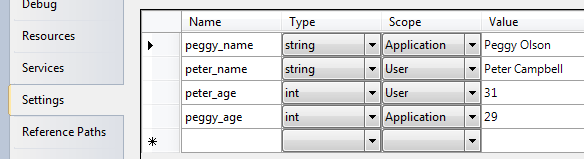
Then you can use ${peggy_name},
${peggy_age},
&{peter_name} and
${peter_age} as variables in your object
definitions. They will be retrieved using the appropriate
scope.
| Note |
|---|---|
|
Changes to user settings during the lifetime of your
application context will not be be visible
to the |
A PropertyFileVariableSource allows to read
properties defined in a Java-style property file as variables.
Assume a file named application.properties in
your application folder containing the following lines:
joan_name=Joan Harris
joan_age=35
You can use the ${joan_name} and
${joan_age} variables in your object definitions
if you configure the following variable source:
<object type="Spring.Objects.Factory.Config.PropertyFileVariableSource, Spring.Core">
  <property name="Location" value="~\application.properties" />               <!-- specify a single ...  -->
  <property name="Locations" value="~\file1.properties,~\file2.properties" /> <!-- or multiple locations -->
  <property name="IgnoreMissingResources" value="true"/>
</object>
| Note |
|---|---|
|
The use of the IgnoreMissingResources
property above will mean that if the property file is not found
it will be silently ignored and the resolution will continue to
the next variable source(s) of the
|
Within PropertyFileVariableSources,
precedence rules differ from the configuration of
VariableSources in the
VariablePlaceholderConfigurer. When the same
property occurs more than once in a property file, the value of the
last entry will be used. Same goes for
specifying the same variable in more than one location in a single
PropertyFileVariableSource: the entry from the
last file will be used.
A ConfigurableVariableSource allows you to
define variables in-line in a variable source definition. To
configure the variables ${midge_name} and
${midge_age}, you can use the following
ConfigurableVariableSource definition:
<object type="Spring.Objects.Factory.Config.ConfigurableVariableSource, Spring.Core">
  <property name="Variables">
    <name-values>
      <add key="midge_name" value="Midge Daniels"/>
      <add key="midge_age" value="33"/>
    </name-values>
  </property>
</object>
You can use commandline arguments as a source for variables.
Assume you issue the following command to start your application
myapp:
myapp /roger_name:"Roger Sterling" /roger_age:57
The following variable source configuration allows you to use
${roger_name} and ${roger_age}
as variables:
<object type="Spring.Objects.Factory.Config.CommandLineArgsVariableSource, Spring.Core">
  <property name="ArgumentPrefix" value ="/" /> <!-- optional; default: "/" -->
  <property name="ValueSeparator" value=":" />  <!-- optional; default: ":" -->
</object>
Entries in the Windows registry can be used as variables. When
your registry contains the key
HKEY_CURRENT_USER\MyKey with entries
freddy_name and freddy_age,
then you can configure the following variable source to use
${freddy_name} and
${freddy_age} as variables:
<object type="Spring.Objects.Factory.Config.RegistryVariableSource, Spring.Core">
  <property name="Key" value="HKEY_CURRENT_USER\MyKey" />
</object>
| Note |
|---|---|
|
The key must be present in the registry when the
configuration is read, otherwise an
|
You can configure an
EnvironmentVariableSource to retrieve variables
from environment variables available through .NET's
System.Environment class:
<object type="Spring.Objects.Factory.Config.EnvironmentVariableSource, Spring.Core" />
To resolve a variable named ${ken_name},
the EnvironmentVariableSource will directly call
System.Environment.GetEnvironmentVariable("ken_name").
Visual Studio has support for configuring database connection
strings in a connectionStrings section in your
application configuration file. You can retrieve these connections
as variables by configuring a
ConnectionStringsVariableSource:
<object type="Spring.Objects.Factory.Config.ConnectionStringsVariableSource, Spring.Core" />
Assuming the following connection strings section in your application configuration file:
<connectionStrings>
  <add name="myConnection"
       connectionString="Data Source=myserver;Integrated Security=True;..."
       providerName="System.Data.SqlClient" />
</connectionStrings>
Then you would use the variables as in following object definition:
<object type="Example.MyClass, MyAssembly">
  <property name="ConnectionString" value="${myConnection.connectionString}" />
  <property name="ProviderName" value="${myConnection.providerName}" />
</object>
| Note |
|---|---|
|
Append ".connectionString" to the connection name to get the connection string and append ".providerName" to the connection name to get the provider name. |
| Note |
|---|---|
|
When adding a connection using Visual Studio's application
settings user interface, your connection will be named similar
to |
The SpecialFolderVariableSource resolves
the full path for variable names against special folders as defined
by the System.Environment.SpecialFolder
enumeration. Add it to your variable sources as:
<object type="Spring.Objects.Factory.Config.SpecialFolderVariableSource, Spring.Core" />
Now you can inject the full path to the current user's desktop, or to this machine's program files folders:
<object id="specials" type="Example.Specials, Spring.IocQuickStart.VariableSources">
  <property name="FullPathToDesktop" value="${Desktop}" />
  <property name="FullPathToPrgramFiles" value="${ProgramFiles}" />
</object>
Any entry in the System.Environment.SpecialFolder enumeration can be used as a variable name.
The IVariableSource is the base interface
for providing the ability to get the value of property placeholders
(name-value) pairs from a variety of sources. The
IVariableSource interface is shown below:
public interface IVariableSource
{
  bool CanResolveVariable(string name);
  string ResolveVariable(string name);
}
This is a simple contract to implement if you should decide to
create your own custom implementation. Look at the source code of
the current implementations for some inspiration if you go that
route. To register your own custom implementation, simply configure
VariablePlaceholderConfigurer to refer to your
class.
The Spring.Objects.Factory.IFactoryObject
interface is to be implemented by objects that are themselves
factories.
The IFactoryObject interface is a point of
pluggability into the Spring IoC containers instantiation logic. If you
have some complex initialization code that is better expressed in C# as
opposed to a (potentially) verbose amount of XML, you can create your
own IFactoryObject, write the complex initialization
inside that class, and then plug your custom
IFactoryObject into the container.
The IFactoryObject interface provides one
method and two (read-only) properties:
object GetObject(): has to return an
instance of the object this factory creates. The instance can
possibly be shared (depending on whether this factory provides
singletons or prototypes).
bool IsSingleton: has to return
true if this IFactoryObject returns singletons,
false otherwise.
Type ObjectType: has to return either the
object type returned by the GetObject()
method or null if the type isn't known in
advance.
IFactoryObject
The IFactoryObject concept and interface is used in a number of
places within the Spring Framework. Some examples of its use is
described in Section 5.3.9, “Setting a reference using the members of other objects and
classes.” for the
PropertyRetrievingFactoryObject and
FieldRetrievingFactoryObject. An additional use of
creating an custom IFactoryObject implementation is to retrieve an
object from an embedded resource file and use it to set another objects
dependency. An example of this is provided here.
Finally, there is sometimes a need to ask a container for an
actual IFactoryObject instance itself, not the object
it produces. This may be achieved by prepending the object id with
'&' (sans quotes) when calling the
GetObject method of the
IObjectFactory (including
IApplicationContext). So for a given
IFactoryObject with an id of
'myObject', invoking
GetObject("myObject") on the container will return
the product of the IFactoryObject, but invoking
GetObject("&myObject") will return the
IFactoryObject instance itself.
The
Spring.Objects.Factory.IConfigurableFactoryObject
interface inherits from IFactoryObject interface
and adds the following property.
IObjectDefinition ProductTemplate :
Gets the template object definition that should be used to
configure the instance of the object managed by this
factory.
IConfigurableFactoryObject implementions you
already have examples of in Section 29.3, “Client-side” are
WebServiceProxyFactory.
While the Spring.Objects namespace provides basic
functionality for managing and manipulating objects, often in a
programmatic way, the Spring.Context namespace
introduces the IApplicationContext interface, which
enhances the functionality provided by the
IObjectFactory interface in a more
framework-oriented style. Many users will use
ApplicationContext in a completely declarative fashion, not even having to
create it manually, but instead relying on support classes such as the
.NET configuration section handlers such as ContextHandler and
WebContextHandler together to declaratively define the ApplicationContext
and retrieve it though a ContextRegistry. (Of course it is still possible
to create an IApplicationContext
Programatically).
The basis for the context module is the
IApplicationContext interface, located in the
Spring.Context namespace. Deriving from the
IObjectFactory interface, it provides all the
functionality of the IObjectFactory. To be able to work
in a more framework-oriented fashion, using layering and hierarchical
contexts, the Spring.Context namespace also provides
the following functionality
Loading of multiple (hierarchical) contexts, allowing some of them to be focused and used on one particular layer, for example the web layer of an application.
Access to localized resources at the
application level by implementing
IMessageSource.
Uniform access to resources that can be
read in as an InputStream, such as URLs and files by implementing
IResourceLoader
Loosely Coupled Event Propagation. Publishers and subscribers of events do not have to be directly aware of each other as they register their interest indirectly through the application context.
Short version: use an
IApplicationContext unless you
have a really good reason for not doing so. For those of you that are
looking for slightly more depth as to the 'but why' of the above
recommendation, keep reading.
As the IApplicationContext includes all the
functionality the object factory via its inheritance of the
IObjectFactory interface, it is generally recommended
to be used over the IObjectFactory except for a few
limited situations where memory consumption might be critical. This may
become more important if the .NET Compact Framework is supported. The
history of IObjectFactory comes from the Spring Java
framework, where the use of Spring in Applets was a concern to reduce
memory consumption. However, for most 'typical' enterprise applications
and systems, the IApplicationContext is what you will
want to use. Spring generally makes heavy use of the
IObjectPostProcessor extension point (to effect
proxying and suchlike), and if you are using just a plain
IObjectFactory then a fair amount of support such as
transactions and AOP will not take effect (at least not without some
extra steps on your part), which could be confusing because nothing will
actually be wrong with the configuration.
Find below a feature matrix that lists what features are provided
by the IObjectFactory and
IApplicationContext interfaces (and attendant
implementations). The following sections describe functionality that
IApplicationContext adds to the basic
IObjectFactory capabilities in a lot more depth than
the said feature matrix.)
| Feature | IObjectFactory | IApplicationContext |
|---|---|---|
Object instantiation/wiring | Yes | Yes |
Automatic | No | Yes |
Automatic
| No | Yes |
Convenient | No | Yes |
| No | Yes |
| Singleton service locator style access | No | Yes |
| Declarative registration of custom resource protocol handler, XML Parsers for object definitions, and type aliases | No | Yes |
Well known locations in the .NET application configuration file are used to register resource handlers, custom parsers, type alias, and custom type converts in addition to the context and objects sections mentioned previously. A sample .NET application configuration file showing all these features is shown below. Each section requires the use of a custom configuration section handler. Note that the types shown for resource handlers and parsers are fictional.
<configuration>

  <configSections>
    <sectionGroup name="spring">

      <section name="context" type="Spring.Context.Support.ContextHandler, Spring.Core"/>
      <section name="objects" type="Spring.Context.Support.DefaultSectionHandler, Spring.Core" />

      <section name="parsers" type="Spring.Context.Support.NamespaceParsersSectionHandler, Spring.Core"/>
      <section name="resourceHandlers" type="Spring.Context.Support.ResourceHandlersSectionHandler, Spring.Core"/>
      <section name="typeAliases" type="Spring.Context.Support.TypeAliasesSectionHandler, Spring.Core"/>
      <section name="typeConverters" type="Spring.Context.Support.TypeConvertersSectionHandler, Spring.Core"/>

     </sectionGroup>
  </configSections>

  <spring>
    <parsers>
      <parser type="Spring.Aop.Config.AopNamespaceParser, Spring.Aop" />
      <parser type="Spring.Data.Config.DatabaseNamespaceParser, Spring.Data" />
    </parsers>

    <resourceHandlers>
      <handler protocol="db" type="MyCompany.MyApp.Resources.MyDbResource"/>
    </resourceHandlers>

    <context caseSensitive="false">
      <resource uri="config://spring/objects"/>
      <resource uri="db://user:pass@dbName/MyDefinitionsTable"/>
    </context>

    <typeAliases>
       <alias name="WebServiceExporter" type="Spring.Web.Services.WebServiceExporter, Spring.Web"/>
       <alias name="DefaultPointcutAdvisor" type="Spring.Aop.Support.DefaultPointcutAdvisor, Spring.Aop"/>
       <alias name="AttributePointcut" type="Spring.Aop.Support.AttributeMatchMethodPointcut, Spring.Aop"/>
       <alias name="CacheAttribute" type="Spring.Attributes.CacheAttribute, Spring.Core"/>
       <alias name="MyType" type="MyCompany.MyProject.MyNamespace.MyType, MyAssembly"/>
     </typeAliases>

    <typeConverters>
      <converter for="Spring.Expressions.IExpression, Spring.Core" type="Spring.Objects.TypeConverters.ExpressionConverter, Spring.Core"/>
      <converter for="MyTypeAlias" type="MyCompany.MyProject.Converters.MyTypeConverter, MyAssembly"/>
    </typeConverters>

    <objects xmlns="http://www.springframework.net">
        ...
    </objects>

  </spring>

</configuration>
The new sections are described below. The attribute
caseSensitive allows the for both
IObjectFactory and
IApplicationContext implementations to not pay
attention to the case of the object names. This is important in web
applications so that ASP.NET pages can be resolved in a case independent
manner. The default value is true.
Instead of using the default XML schema that is generic in nature
to define an object's properties and dependencies, you can create your
own XML schema specific to an application domain. This has the benefit
of being easier to type and getting XML intellisense for the schema
being used. The downside is that you need to write code that will
transform this XML into Spring object definitions. One would typically
implement a custom parser by deriving from the class
ObjectsNamespaceParser and overriding the methods
 int ParseRootElement(XmlElement root, XmlResourceReader
      reader)
and int ParseElement(XmlElement element,
XmlResourceReader reader). Registering custom parsers outside
of App.config will be addressed in a future release.
To register a custom parser register a section handler of the type
Spring.Context.Support.NamespaceParsersSectionHandler
in the configSecitons section of App.config. The parser configuration
section contains one or more <parser> elements each with a type
attribute. Below is an example that registers all the namespaces
provided in Spring.
| Note |
|---|---|
|
As of Spring.NET 1.2.0 it is no longer necessary to explicitly configure the namespace parsers that come with Spring via a custom section in App.config. You will still need to register custom namespace parsers if you are writing your own. |
<configuration>

  <configSections>
    <sectionGroup name="spring">
      <!-- other configuration section handler defined here -->
      <section name="parsers" type="Spring.Context.Support.NamespaceParsersSectionHandler, Spring.Core"/>
     </sectionGroup>
  </configSections>

  <spring>
    <parsers>
      <parser type="Spring.Aop.Config.AopNamespaceParser, Spring.Aop" />
      <parser type="Spring.Data.Config.DatabaseNamespaceParser, Spring.Data" />
      <parser type="Spring.Transaction.Config.TxNamespaceParser, Spring.Data" />
      <parser type="Spring.Validation.Config.ValidationNamespaceParser, Spring.Core" />
      <parser type="Spring.Remoting.Config.RemotingNamespaceParser, Spring.Services" />
    </parsers>
  </spring>

</configuration>
You can also register custom parser programmatically using the NamespaceParserRegistry. Here is an example taken from the code used in the Transactions Quickstart application.
NamespaceParserRegistry.RegisterParser(typeof(DatabaseNamespaceParser));
NamespaceParserRegistry.RegisterParser(typeof(TxNamespaceParser));
NamespaceParserRegistry.RegisterParser(typeof(AopNamespaceParser));

IApplicationContext context =
      new XmlApplicationContext("assembly://Spring.TxQuickStart.Tests/Spring.TxQuickStart/system-test-local-config.xml");
Creating a custom resource handler means implementing the
IResource interface. The base class
AbstractResource is a useful starting point. Look at
the Spring source for classes such as
FileSystemResource or
AssemblyResource for implementation tips. You can
register your custom resource handler either within App.config, as shown
in the program listing at the start of this section using a
.ResourceHandlersSectionHandler or define an object
of the type
Spring.Objects.Factory.Config.ResourceHandlerConfigurer
as you would any other Spring managed object. An example of the latter
is shown below:
<object id="myResourceHandlers" type="Spring.Objects.Factory.Config.ResourceHandlerConfigurer, Spring.Core">
      <property name="ResourceHandlers">
          <dictionary>
              <entry key="db" value="MyCompany.MyApp.Resources.MyDbResource, MyAssembly"/>
          </dictionary>
      </property>
</object>
Type aliases allow you to simplify Spring configuration file by replacing fully qualified type name with an alias for frequently used types. Aliases can be registered both within a config file and programatically and can be used anywhere in the context config file where a fully qualified type name is expected. Type aliases can also be defined for generic types.
One way to configure a type alias is to define them in a custom config section in the Web/App.config file for your application, as well as the custom configuration section handler. See the previous XML configuration listing for an example that makes an alias for the WebServiceExporter type. Once you have aliases defined, you can simply use them anywhere where you would normally specify a fully qualified type name:
<object id="MyWebService" type="WebServiceExporter">
    ...
</object>

<object id="cacheAspect" type="DefaultPointcutAdvisor">
    <property name="Pointcut">
        <object type="AttributePointcut">
            <property name="Attribute" value="CacheAttribute"/>
        </object>
    </property>
    <property name="Advice" ref="aspNetCacheAdvice"/>
</object>
To register a type alias register a section handler of the type
Spring.Context.Support.TypeAliasesSectionHandler in
the configSecitons section of App.config. The type alias configuration
section contains one or more <alias> elements each with a name and
a type attribute. Below is an example that registers the alias for
WebServiceExporter
<configuration>

  <configSections>
    <sectionGroup name="spring">
      <!-- other configuration section handler defined here -->
      <section name="typeAliases" type="Spring.Context.Support.TypeAliasesSectionHandler, Spring.Core"/>
     </sectionGroup>
  </configSections>

  <spring>
    <typeAliases>
       <alias name="WebServiceExporter" type="Spring.Web.Services.WebServiceExporter, Spring.Web"/>
    </typeAliases>
  </spring>

</configuration>
For an example showing type aliases for generic types see Section 5.2.6, “Object creation of generic types”.
Another way is to define an object of the type
Spring.Objects.Factory.Config.TypeAliasConfigurer
within the regular <objects> section of any standard Spring
configuration file. This approach allows for more modularity in defining
type aliases, for example if you can't access App.config/Web.config. An
example of registration using a TypeAliasConfigurer
is shown below
<object id="myTypeAlias" type="Spring.Objects.Factory.Config.TypeAliasConfigurer, Spring.Core">
      <property name="TypeAliases">
          <dictionary>
              <entry key="WebServiceExporter" value="Spring.Web.Services.WebServiceExporter, Spring.Web"/>
              <entry key="DefaultPointcutAdvisor" value="Spring.Aop.Support.DefaultPointcutAdvisor, Spring.Aop"/>
              <entry key="MyType" value="MyCompany.MyProject.MyNamespace.MyType, MyAssembly"/>
          </dictionary>
      </property>
</object>
The standard .NET mechanism for specifying a type converter is to
add a TypeConverter attribute to a type definition to
specify the type of the Converter. This is the preferred way of defining
type converters if you control the source code for the type that you
want to define a converter for. However, this configuration section
allows you to specify converters for the types that you don't control,
and it also allows you to override some of the standard type converters,
such as the ones that are defined for some of the types in the .NET Base
Class Library.
You can specify the type converters in App.config by using
Spring.Context.Support.TypeConvertersSectionHandler as shown before or
define an object of the type
Spring.Objects.Factory.Config.CustomConverterConfigurer.
An example of registration using a
CustomConverterConfigurer is shown below
<object id="myTypeConverters" type="Spring.Objects.Factory.Config.CustomConverterConfigurer, Spring.Core">
      <property name="CustomConverters">
          <dictionary>
              <entry key="System.Date" value="MyCompany.MyProject.MyNamespace.MyCustomDateConverter, MyAssembly"/>
          </dictionary>
      </property>
</object>
As already stated in the previous section, the
IApplicationContext has a couple of features that
distinguish it from the IObjectFactory. Let us review
them one-by-one.
You can structure the configuration information of application context into hierarchies that naturally reflect the internal layering of your application. As an example, abstract object definitions may appear in a parent application context configuration file, possibly as an embedded assembly resource so as not to invite accidental changes.
<spring>
  <context>
    <resource uri="assembly://MyAssembly/MyProject/root-objects.xml"/>
    <context name="mySubContext">
      <resource uri="file://objects.xml"/>
    </context>
  </context>
</spring>
The nesting of context
elements reflects the parent-child hierarchy you are creating. The
nesting can be to any level though it is unlikely one would need a deep
application hierarchy. The xml file must contain the
<objects> as the root name. Another example of
a hierarchy, but using sections in the application configuration file is
shown below.
<configSections>
  <sectionGroup name="spring">
    <section name="context" type="Spring.Context.Support.ContextHandler, Spring.Core"/>
    <section name="objects" type="Spring.Context.Support.DefaultSectionHandler, Spring.Core" />
    <sectionGroup name="child">
      <section name="objects" type="Spring.Context.Support.DefaultSectionHandler, Spring.Core" />
    </sectionGroup>
  </sectionGroup>
</configSections>

<spring>

  <context name="ParentContext">
    <resource uri="config://spring/objects"/>
    <context name="ChildContext">
      <resource uri="config://spring/child/objects"/>
    </context>
  </context>

  <objects xmlns="http://www.springframework.net">

    ...

  </objects>

  <child>
    <objects xmlns="http://www.springframework.net">

      ...

    </objects>
  </child>

</spring>
As a reminder, the type attribute of the
context tag is optional and defaults to
Spring.Context.Support.XmlApplicationContext. The
name of the context can be used in conjunction with the service locator
class, ContextRegistry, discussed in Section 5.15, “Service Locator access”
The IApplicationContext interface extends an
interface called IMessageSource and provides
localization (i18n or internationalization) services for text messages
and other resource data types such as images. This functionality makes
it easier to use .NET's localization features at an application level
and also offers some performance enhancements due to caching of
retrieved resources. Together with the
NestingMessageSource, capable of hierarchical message
resolving, these are the basic interfaces Spring.NET provides for
localization. Let's quickly review the methods defined there:
string GetMessage(string name): retrieves
a message from the IMessageSource and using
CurrentUICulture.
string GetMessage(string name, CultureInfo
            cultureInfo)
: retrieves a message from the
IMessageSource using a specified
culture.
string GetMessage(string name, params object[]
            args)
: retrieves a message from the
IMessageSource using a variable list of
arguments as replacement values in the message. The
CurrentUICulture is used to resolve the message.
string GetMessage(string name, CultureInfo
            cultureInfo, params object[] args)
: retrieves a message
from the IMessageSource using a variable list
of arguments as replacement values in the message. The specified
culture is used to resolve the message.
string GetMessage(string name, string
            defaultMessage, CultureInfo culture, params object[]
            arguments)
: retrieves a message from the
IMessageSource using a variable list of
arguments as replacement values in the message. The specified
culture is used to resolve the message. If no message can be
resolved, the default message is used.
string GetMessage(IMessageSourceResolvable
            resolvable, CultureInfo culture)
: all properties used
in the methods above are also wrapped in a class - the
MessageSourceResolvable, which you can use in
this method.
object GetResourceObject(string name):Get
a localized resource object, i.e. Icon, Image, etc. given the
resource name. The CurrentUICulture is used to resolve the
resource object.
object GetResourceObject(string name, CultureInfo
            cultureInfo)
:Get a localized resource object, i.e. Icon,
Image, etc. given the resource name. The specified culture is used
to resolve the resource object.
void ApplyResources(object value, string
            objectName, CultureInfo cultureInfo)
: Uses a
ComponentResourceManager to apply resources to all object
properties that have a matching key name. Resource key names are
of the form objectName.propertyName
When an IApplicationContext gets loaded, it
automatically searches for an IMessageSource object
defined in the context. The object has to have the name
messageSource. If such an object is found, all calls
to the methods described above will be delegated to the message source
that was found. If no message source was found, the
IApplicationContext checks to see if it has a parent
containing a similar object, with a similar name. If so, it uses that
object as the IMessageSource. If it can't find any
source for messages, an empty StaticMessageSource
will be instantiated in order to be able to accept calls to the methods
defined above.
![[Warning]](images/admons/warning.png) | Fallback behavior |
|---|---|
|
The fallback rules for localized resources seem to have a bug that is fixed by applying Service Pack 1 for .NET 1.1. This affects the use of IMessageSource.GetMessage methods that specify CultureInfo. The core of the issue in the .NET BCL is the method ResourceManager.GetObject that accepts CultureInfo. |
Spring.NET provides two IMessageSource
implementations. These are ResourceSetMessageSource
and StaticMessageSource. Both implement
IHierarchicalMessageSource to resolve messages
hierarchically. The StaticMessageSource is hardly
ever used but provides programmatic ways to add messages to the source.
The ResourceSetMessageSource is more interesting and
an example is provided for in the distribution and discussed more
extensively in the Chapter 41, IoC Quickstarts section. The
ResourceSetMessageSource is configured by providing a
list of ResourceManagers. When a message code is to
be resolved, the list of ResourceManagers is searched to resolve the
code. For each ResourceManager a
ResourceSet is retrieved and asked to resolve the
code. Note that this search does not replace the standard hub-and-spoke
search for localized resources. The ResourceManagers list specifies the
multiple 'hubs' where the standard search starts.
<object name="messageSource" type="Spring.Context.Support.ResourceSetMessageSource, Spring.Core">
  <property name="resourceManagers">
    <list>
       <value>Spring.Examples.AppContext.MyResource, Spring.Examples.AppContext</value>
    </list>
  </property>
</object>
You can specify the arguments to construct a ResourceManager as a
two part string value containing the base name of the resource and the
assembly name. This will be converted to a ResourceManager via the
ResourceManagerConverter TypeConverter. This
converter can be similarly used to set a property on any object that is
of the type ResourceManager. You may also specify an
instance of the ResourceManager to use via an object
reference. The convenience class
Spring.Objects.Factory.Config.ResourceManagerFactoryObject
can be used to conveniently create an instance of a ResourceManager.
<object name="myResourceManager" type="Spring.Objects.Factory.Config.ResourceManagerFactoryObject, Spring.Core">
  <property name="baseName">
    <value>Spring.Examples.AppContext.MyResource</value>
  </property>
  <property name="assemblyName">
    <value>Spring.Examples.AppContext</value>
  </property>
</object>
In application code, a call to GetMessage will
retrieve a properly localized message string based on a code value. Any
arguments present in the retrieved string are replaced using
String.Format semantics. The ResourceManagers,
ResourceSets and retrieved strings are cached to provide quicker lookup
performance. The key 'HelloMessage' is contained in the resource file
with a value of Hello {0} {1}. The following call on
the application context will return the string Hello Mr.
Anderson. Note that the caching of
ResourceSets is via the concatenation of the ResourceManager base name
and the CultureInfo string. This combination must be unique.
string msg = ctx.GetMessage("HelloMessage",
                            new object[] {"Mr.", "Anderson"},
                            CultureInfo.CurrentCulture );
It is possible to chain the resolution of messages by passing
arguments that are themselves messages to be resolved giving you greater
flexibility in how you can structure your message resolution. This is
achieved by passing as an argument a class that implements
IMessageResolvable instead of a string literal. The
convenience class DefaultMessageResolvable is
available for this purpose. As an example if the resource file contains
a key name error.required that has the value
'{0} is required {1}' and another key name
field.firstname with the value 'First
name'. The following code will create the string
'First name is required dude!'
string[] codes = {"field.firstname"};
DefaultMessageResolvable dmr = new DefaultMessageResolvable(codes, null);
ctx.GetMessage("error.required",
		new object[] { dmr, "dude!" },
                CultureInfo.CurrentCulture ));
The examples directory in the distribution contains an example
program, Spring.Examples.AppContext, that
demonstrates usage of these features.
The IMessageSourceAware interface can also be
used to acquire a reference to any IMessageSource
that has been defined. Any object that is defined in an
IApplicationContext that implements the
IMessageSourceAware interface will be injected with
the application context's IMessageSource when it (the
object) is being created and configured.
A lot of applications need to access resources. Resources here,
might mean files, but also news feeds from the Internet or normal web
pages. Spring.NET provides a clean and transparent way of accessing
resources in a protocol independent way. The
IApplicationContext has a method
(GetResource(string)) to take care of this. Refer to
Section 7.1, “Introduction” for more information on the string
format to use and the IResource abstraction in
general.
The Eventing Registry allows developers to utilize a loosely coupled event wiring mechanism. By decoupling the event publication and the event subscription, most of the mundane event wiring is handled by the IoC container. Event publishers can publish their event to a central registry, either all of their events or a subset based on criteria such as delegate type, name, return value, etc... Event subscribers can choose to subscribe to any number of published events. Subscribers can subscriber to events based on the type of object exposing them, allowing one subscriber to handle all events of a certain type without regards to how many different instances of that type are created.
The Spring.Objects.Events.IEventRegistry
interface represents the central registry and defines publish and
subscribe methods.
void PublishEvents( object sourceObject
): publishes all events of the source object to
subscribers that implement the correct handler methods.
void Subscribe(object subscriber ): The
subscriber receives all events from the source object for which it
has matching handler methods.
void Subscribe(object subscriber, Type
targetSourceType ): The subscriber receives all events
from a source object of a particular type for which it has
matching handler methods.
void Unsubscribe(object subscriber ):
Unsubscribe all events from the source object for which it has
matching handler methods.
void Unsubscribe(object subscriber, Type
targetSourceType ): Unsubscribe all events from a source
object of a particular type for which it has matching handler
methods.
IApplicationContext implements this
interface and delegates the implementation to an instance of
Spring.Objects.Events.Support.EventRegistry. You are
free to create and use as many EventRegistries as you like but since it
is common to use only one in an application,
IApplicationContext provides convenient access to a
single instance.
Within the
example/Spring/Spring.Examples.EventRegistry
directory you will find an example on how to use this functionality.
When you open up the project, the most interesting file is the
EventRegistryApp.cs file. This application loads a set of object
definitions from the application configuration file into an
IApplicationContext instance. From there, three
objects are loaded up: one publisher and two subscribers. The publisher
publishes its events to the IApplicationContext
instance:
// Create the Application context using configuration file
IApplicationContext ctx = ContextRegistry.GetContext();
// Gets the publisher from the application context
MyEventPublisher publisher = (MyEventPublisher)ctx.GetObject("MyEventPublisher");
// Publishes events to the context.
ctx.PublishEvents( publisher );
One of the two subscribers subscribes to all events
published to the IApplicationContext instance, using
the publisher type as the filter criteria.
// Gets first instance of subscriber
MyEventSubscriber subscriber = (MyEventSubscriber)ctx.GetObject("MyEventSubscriber");
// Gets second instance of subscriber
MyEventSubscriber subscriber2 = (MyEventSubscriber)ctx.GetObject("MyEventSubscriber");
// Subscribes the first instance to the any events published by the type MyEventPublisher
ctx.Subscribe( subscriber, typeof(MyEventPublisher) ); This
will wire the first subscriber to the original event publisher. Anytime
the event publisher fires an event,
(publisher.ClientMethodThatTriggersEvent1();) the
first subscriber will handle the event, but the second subscriber will
not. This allows for selective subscription, regardless of the original
prototype definition.
Event handling in the IApplicationContext is
provided through the IApplicationEventListener
interface that contains the single method void
HandleApplicationEvent( object source, ApplicationEventArgs
applicationEventArgs ). Classes that implement the
IApplicationEventListener interface are automatically
registered as a listener with the
IApplicationContext. Publishing an event is done via
the context's PublishEvent( ApplicationEventArgs eventArgs
) method. This implementation is based on the traditional
Observer design pattern.
The event argument type, ApplicationEventArgs,
adds the time of the event firing as a property. The derived class
ContextEventArgs is used to notify observers on the
lifecycle events of the application context. It contains a property
ContextEvent Event that returns the enumeration
Refreshed or Closed.. The
Refreshed enumeration value indicated that the
IApplicationContext was either initialized or
refreshed. Initialized here means that all objects are loaded,
singletons are pre-instantiated and the
IApplicationContext is ready for use. The
Closed is published when the
IApplicationContext is closed using the
Dispose() method on the
IConfigurableApplicationContext interface. Closed
here means that singletons are destroyed.
Implementing custom events can be done as well. Simply call the
PublishEvent method on the
IApplicationContext, specifying a parameter which is
an instance of your custom event argument subclass.
Let's have a look at an example. First, the
IApplicationContext:
<object id="emailer" type="Example.EmailObject">
<property name="blackList">
<list>
<value>black@list.org</value>
<value>white@list.org</value>
<value>john@doe.org</value>
</list>
</property>
</object>
<object id="blackListListener" type="Example.BlackListNotifier">
<property name="notificationAddress">
<value>spam@list.org</value>
</property>
</object>and then, the actual objects:
public class EmailObject : IApplicationContextAware {
// the blacklist
private IList blackList;
public IList BlackList
{
set { this.blackList = value; }
}
public IApplicationContext ApplicationContext
{
set { this.ctx = value; }
}
public void SendEmail(string address, string text) {
if (blackList.contains(address))
{
BlackListEvent evt = new BlackListEvent(address, text);
ctx.publishEvent(evt);
return;
}
// send email...
}
}
public class BlackListNotifier : IApplicationEventListener
{
// notification address
private string notificationAddress;
public string NotificationAddress
{
set { this.notificationAddress = value; }
}
public void HandleApplicationEvent(ApplicationEvent evt)
{
if (evt instanceof BlackListEvent)
{
// notify appropriate person
}
}
}
The IObjectFactory already offers a number of
mechanisms to control the lifecycle of objects deployed in it (such as
marker interfaces like IInitializingObject and
System.IDisposable, their configuration only
equivalents such as init-method and
destroy-method) attributes in an XmlObjectFactory
configuration, and object post-processors. In an
IApplicationContext, all of these still work, but
additional mechanisms are added for customizing behavior of objects and
the container.
All marker interfaces available with ObjectFactories still work.
The IApplicationContext does add one extra marker
interface which objects may implement,
IApplicationContextAware. An object which implements
this interface and is deployed into the context will be called back on
creation of the object, using the interface's
ApplicationContext property, and provided with a
reference to the context, which may be stored for later interaction with
the context.
Object post-processors are classes which implement the
Spring.Objects.Factory.Config.IObjectPostProcessor
interface, have already been mentioned. It
is worth mentioning again here though, that post-processors are much
more convenient to use in IApplicationContexts than
in plain IObjectFactory instances. In an
IApplicationContext, any deployed object which
implements the above marker interface is automatically detected and
registered as an object post-processor, to be called appropriately at
creation time for each object in the factory.
Object factory post-processors are classes which implement the
Spring.Objects.Factory.Config.IObjectFactoryPostProcessor
interface, have already
been mentioned. It is worth mentioning again here though, that object
factory post-processors are much more convenient to use in
IApplicationContexts. In an
IApplicationContext, any deployed object which
implements the above marker interface is automatically detected as an
object factory post-processor, to be called at the appropriate
time.
The PropertyPlaceholderConfigurer has already been
described in the context of its use within an
IObjectFactory. It is worth mentioning here though,
that it is generally more convenient to use it with an
IApplicationContext, since the context will
automatically recognize and apply any object factory post-processors,
such as this one, when they are simply deployed into it like any other
object. There is no need for a manual step to execute it.
The class GenericApplicationContext can be used as a basis for creating an IApplicationContext implementation that read the container meta data from sources other than XML. This could be by scanning objects in a .DLL for known attributes or a scripting language that leverages a DSL to create terse IObjectDefinitions. There is a class, Spring.Objects.Factory.Support.ObjectDefinitionBuilder offers some convenience methods for creating an IObjectDefinition in a less verbose manner than using the RootObjectDefinition API. The following shows how to configure the GenericApplicationContext to read from XML, just so show familiar API usage
GenericApplicationContext ctx = new GenericApplicationContext();
XmlObjectDefinitionReader reader = new XmlObjectDefinitionReader(ctx);
reader.LoadObjectDefinitions("assembly://Spring.Core.Tests/Spring.Context.Support/contextB.xml");
reader.LoadObjectDefinitions("assembly://Spring.Core.Tests/Spring.Context.Support/contextC.xml");
reader.LoadObjectDefinitions("assembly://Spring.Core.Tests/Spring.Context.Support/contextA.xml");
ctx.Refresh();
The implementation of IObjectDefinitionReader is responsible for creating the configuration meta data, i.e., implementations of RootObjectDefinition, etc. Note a web version of this application class has not yet been implemented.
For a an even richer XML-free configuration experience, refer instead to the Spring CodeConfig approach.
The majority of the code inside an application is best written in a
Dependency Injection (Inversion of Control) style, where that code is
served out of an IObjectFactory or
IApplicationContext container, has its own dependencies
supplied by the container when it is created, and is completely unaware of
the container. However, there is sometimes a need for singleton (or
quasi-singleton) style access to an IObjectFactory or
IApplicationContext. For example, third party code may
try to construct a new object directly without the ability to force it to
get these objects out of the IObjectFactory. Similarly, nested user
control components in a WinForms application are created inside the
generated code in InitializeComponent. If this user control would like to
obtain references to objects contained in the container it can use the
service locator style approach and 'reach out' from inside the code to
obtain the object it requires. (Note support for DI in WinForms is under
development.)
The Spring.Context.Support.ContextRegistry class
allows you to obtain a reference to an
IApplicationContext via a static locator method. The
ContextRegistry is initialized when creating an
IApplicationContext through use of the
ContextHandler discussed previously. The simple static
method GetContext() can then be used to retrieve the
context. Alternatively, if you create an
IApplicationContext though other means you can register
it with the ContextRegistry via the method
void RegisterContext(IApplicationContext context) in
the start-up code of your application. Hierarchical context retrieval is
also supported though the use of the GetContext(string
name) method, for example:
IApplicationContex ctx = ContextRegistry.GetContext("mySubContext");This would retrieve the nested context for the context configuration shown previously.
<spring>
<context>
<resource uri="assembly://MyAssembly/MyProject/root-objects.xml"/>
<context name="mySubContext">
<resource uri="file://objects.xml"/>
</context>
</context>
</spring>
Do not call ContextRegistry.GetContext within a constructor as it will result in and endless recursion. (This is scheduled to be fixed in 1.1.1) In this case it is quite likely you can use the IApplicationContextAware interface and then retrieve other objects in a service locator style inside an initialization method.
The ContextRegistry.Clear() method will remove
all contexts. On .NET 2.0, this will also call the ConfigurationManager's
RefreshSection method so that the Spring context configuration section
will be reread from disk when it is retrieved again. Note that in a web
application RefeshSection will not work as advertised and you will need to
touch the web.config files to reload a configuration.
Beginning with Spring 1.2, the [Repository] attribute was introduced as a marker for any class that fulfils the role or stereotype of a repository (a.k.a. Data Access Object or DAO). Among the possibilities for leveraging such a marker is the automatic translation of exceptions as described in Exception Translation.
Spring 1.2 introduces further stereotype attributes: [Component] and [Service]. [Component] serves as a generic stereotype for any Spring-managed component; whereas, [Repository] and [Service] serve as specializations of [Component] for more specific use cases (e.g., in the persistence and service layers, respectively). The ASP.NET MVC [Controller] attribute will serve this purpose for the controller layer. What this means is that you can annotate your component classes with [Component], but by annotating them with [Repository] or [Service] your classes are more properly suited for processing by tools or associating with aspects. For example, these stereotype attributes make ideal targets for pointcuts. Of course, it is also possible that [Repository] and [Service] may carry additional semantics in future releases of the Spring Framework. Thus, if you are making a decision between using [Component] or [Service] for your service layer, [Service] is clearly the better choice. Similarly, as stated above, [Repository] is already supported as a marker for automatic exception translation in your persistence layer. The next version of Spring will use the [Component] attribute to perform attribute based autowiring by-type as in the Spring Java Framework.
[1] See the section entitled Section 3.1, “Inversion of Control”
[2] More information about assembly names can be found in the Assembly Names section of the .NET Framework Developer's Guide (installed as part of the .NET SDK), or online at Microsoft's MSDN website, by searching for Assembly Names.
[3] More information about creating custom
TypeConverter implementations can be found online
at Microsoft's MSDN website, by searching for Implementing a
Type Converter.